Short answer
Both numbers can be right. Each speed test measures the path from your device to its own server, in its own place, with its own method.
So trust the test that fits your question. To check the speed you pay for, test on a computer plugged into the router with a cable. To see what a slow phone really gets, test on that phone. Only compare results taken on the same device and connection, a few minutes apart.
Every speed test measures this whole path, up to its own server. Different tests end at different servers.
- Your device. Its Wi-Fi, its browser and how fast it is set a limit of their own.
- Wi-Fi. Walls and distance slow it down. A cable skips this part.
- Your router. A router app’s test, or a “speed to gateway” test in your provider’s app, starts here. It leaves out your Wi-Fi and your device.
- A test server inside your provider’s network. Your provider’s own test often ends here, and so can Speedtest’s nearby server.
- Where your provider meets the rest of the internet. It can get busy in the evening.
- A server farther out. Google’s speed test (M-Lab) usually ends out here, and so do many websites, games and video services.
Why two tests give different numbers
They don’t measure the same thing. Each test picks its own server and has its own way of turning data into one number.
- Speedtest by Ookla: a nearby server with a fast ping. Internet providers and mobile networks run these servers, and you can pick another one. It opens several connections at once, more if it needs them, to show the most your line can carry.
- Google’s speed test (in search results): run by a research group, M-Lab, on servers that are usually outside your provider’s own network. One connection, for about 10 seconds each way. Google says it measures up to 700 Mbps, and faster lines could read lower.
- Cloudflare (speed.cloudflare.com): Cloudflare’s nearest server. It sends files of set sizes several times and doesn’t try to fill your line. So it shows what you typically get, not the most.
- Fast.com (Netflix): Netflix’s own servers. Netflix says most of its viewers get video from servers inside or right next to their provider’s network. Show more info adds upload and ping. Settings changes the number of connections and how long it runs.
- Your provider’s speed test: Xfinity, for example, picks the closest of its test servers by your location. It asks you to test on a computer with a network cable.
- A router app, or a “speed to gateway” test in your provider’s app: measures from your router, not from your phone. So it leaves out your Wi-Fi and your device. eero says its result doesn’t change as you walk around your home. Xfinity also has a “Speed to Device” test: that one is a device test.
- Our speed test: our one test server, and the result names its city. 4 connections, 10 seconds down, then 10 seconds up. It shows your average after the first seconds, not your fastest moment.
- One connection: like one file download. On a fast line or a long path it can use only part of the line. Google’s speed test (M-Lab) works like this.
- Several connections at once, like Speedtest and our test. Together they get close to the most your line can carry.
- When a bit of data gets lost, one connection slows down. With several, the others carry on. M-Lab says that’s why one connection shows problems on the way more clearly.
One connection can show less than your line can carry. Several at once get closer to the most.
So a test with one connection to a far server can show less than a test with many connections to a server inside your provider’s network. Neither one is broken. As Cloudflare puts it, no speed test is a final measure of your provider’s service.
Which result answers your question
Compare two tests fairly
Change one thing at a time. Then you know what made the difference.
- Use the same device in the same place for both tests, in the same browser or app. A computer on a network cable gives the steadiest results. No cable? Use the same phone, close to the router.
- Pause downloads, video and backups, on this device and on the others.
- Turn off any VPN, or leave it on for both tests.
- Run test A twice, then test B twice, straight after each other. In Speedtest, keep the same server. Tests a few minutes apart can still differ a little, Ookla says.
- Do the same again on a weekday evening between 7 and 11 pm. The US regulator (FCC) reports on those busy hours in its own broadband tests.
- Write down every result with the conditions in the log below.
The log keeps your results in this browser. After each new result, it says what changed since the one before and whether the two can be compared. It only knows what you tell it, and it compares the download speeds.
Your results, oldest first
No results yet. Add your first one above.
The log uses these rules:
| Between two results | What it means |
|---|---|
| Nothing changed | A repeat. Small changes are normal; big swings mean the line itself changes. |
| Only the test changed | A fair comparison of the tests. The gap points to their servers and methods. |
| Only the device, connection, VPN, others online or time changed | A fair test of that one thing. The gap points to it: repeat the pair to be sure. |
| A router test against a device test on home Wi-Fi or a cable | A check of your home: a slower device points to the Wi-Fi or the device. |
| Two or more things changed | Not a fair comparison. Test again and change one thing. |
| Downloads within 10% | About the same. This is our own rule of thumb. |
| One result from 7 to 11 pm or on another day, the other not | Counts as a change of time: evenings are the busiest time. |
What our speed test measures
Test it now
Internet speed test
It shows your download and upload speed between this device and our one test server, right now.
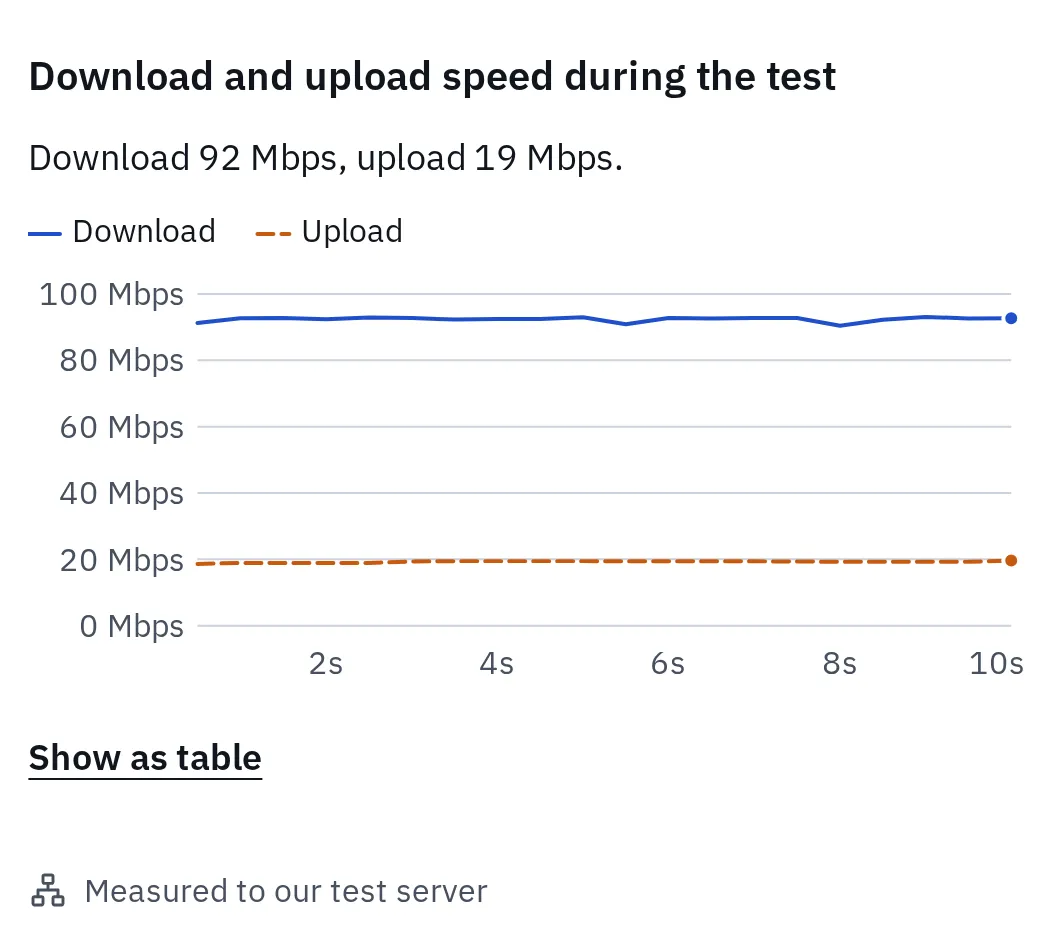
The chart follows the speed through each part of the test. The result is the average after the first seconds, not the highest point.
Here is exactly what it does:
- Ping first: 10 tiny messages to our server. The middle value is your ping.
- Download: 4 connections at once for 10 seconds. The first 1.5 seconds don’t count, because connections start slowly.
- Upload: the same for 10 seconds. The first 2 seconds don’t count.
- The number: all the data that moved after that start, divided by the time. That’s your average, not your fastest moment. A test that shows its peak can look higher.
- Data limit: on a very fast line it stops early, after 400 MB down or 200 MB up. So one run can use up to 600 MB: on mobile data, don’t test again and again.
Other reasons for a gap
When to contact your provider
When the fair results are still slow, contact your provider. Bring results they can look into. Copy the log above gives you the list.
- Your results on a computer with a network cable, with nothing else online.
- At least two different tests, each run more than once.
- The date and time of each, including weekday evenings.
- Your plan’s speed, from your bill or your plan’s page. In the US, it’s on the Broadband Facts label.
Fixes for slow Wi-Fi, an old router or a busy evening are in why is my internet so slow. How much speed you need at all is in what is a good internet speed.
Questions people ask
Which internet speed test is the most accurate?
None is “the” accurate one. Each is accurate for its own path and method. For the speed you pay for, use a test to a nearby server on a computer with a cable. For what a phone or room really gets, test there. Speedtest, Google’s test (M-Lab), Cloudflare, Fast.com, your provider’s test and ours all answer slightly different questions.
Why is my provider's speed test faster than other tests?
Its servers are close to you, often inside your provider’s own network. M-Lab notes that many popular tests are hosted inside providers’ networks. Other tests may cross more of the internet, including the point where your provider meets other networks. Both numbers are real: one for the line to your provider, one for the longer path.
Why is Google's speed test slower than Speedtest?
Google’s test is run by M-Lab. It uses one connection, for about 10 seconds each way, to servers that are usually outside your provider’s own network. Speedtest uses several connections to a nearby server, often run by a provider. Google also says its test measures up to 700 Mbps, so a faster line could read lower.
Why is my router app's speed much higher than my phone's?
The router app measures at the router, so your Wi-Fi and your phone aren’t part of it. A big gap points to your home network. Move closer to the router and test again to see how much the Wi-Fi takes.
Should I average several results?
Only results taken with the same test, device and connection, close together. Never average results from different devices, connections or times. That number doesn’t belong to any of them.
Why does my result change every time I test?
Your line is shared with other homes, and so is the internet beyond it. Tests a few minutes apart can differ a little. If results swing a lot on a cable with nothing else online, write them down with the times and show them to your provider.