Short answer
Check three things: is only the screen protector cracked, does the picture look normal, and does touch work everywhere? If only the glass is cracked, the phone still works, but get it repaired soon. Apple and Samsung replace the glass and the display as one part, so their price is the same either way.
Back up your phone first. A cracked screen can stop showing a picture or stop responding to touch without warning, and then it’s hard to save your photos.
Step 1: is it only the screen protector?
Many phones wear a glass screen protector. It cracks first, which is its job.
- Look at the edges. A crack that stops at the edge of the protector is probably in the protector. Don’t run your finger over cracks.
- Lift the protector at one corner with a fingernail and peel it off slowly.
- Look at the glass under it, in good light.
If the glass under it has no cracks, you only need a new protector. Clean the glass before you fit it: see how to clean a screen safely. If the glass is cracked too, go on to step 2.
Step 2: look at the picture
Test it now
Dead pixel test
Tap through black, white, red, green and blue. They show black blots, lines and dead spots under the cracks clearly. A clean picture doesn’t prove the display wasn’t hurt: Samsung warns the panel can be damaged even when the glass isn’t cracked.
Only the glass is cracked
The phone works for now
Cracks you can see and feel, but the picture is clear on every colour, with no blots, lines or dark spots.
The display is damaged too
Back up and repair soon
Black or purple blots, lines, green or white spots, or parts of the screen that stay dark. They often spread.
Step 3: check that touch works everywhere
Test it now
Touch screen test
Paint every square with one finger, slowly. Squares that stay blank twice may show where touch doesn’t work; a case or protector can block touches too. If the glass is badly broken or sharp, skip this check and let the repair shop test touch.
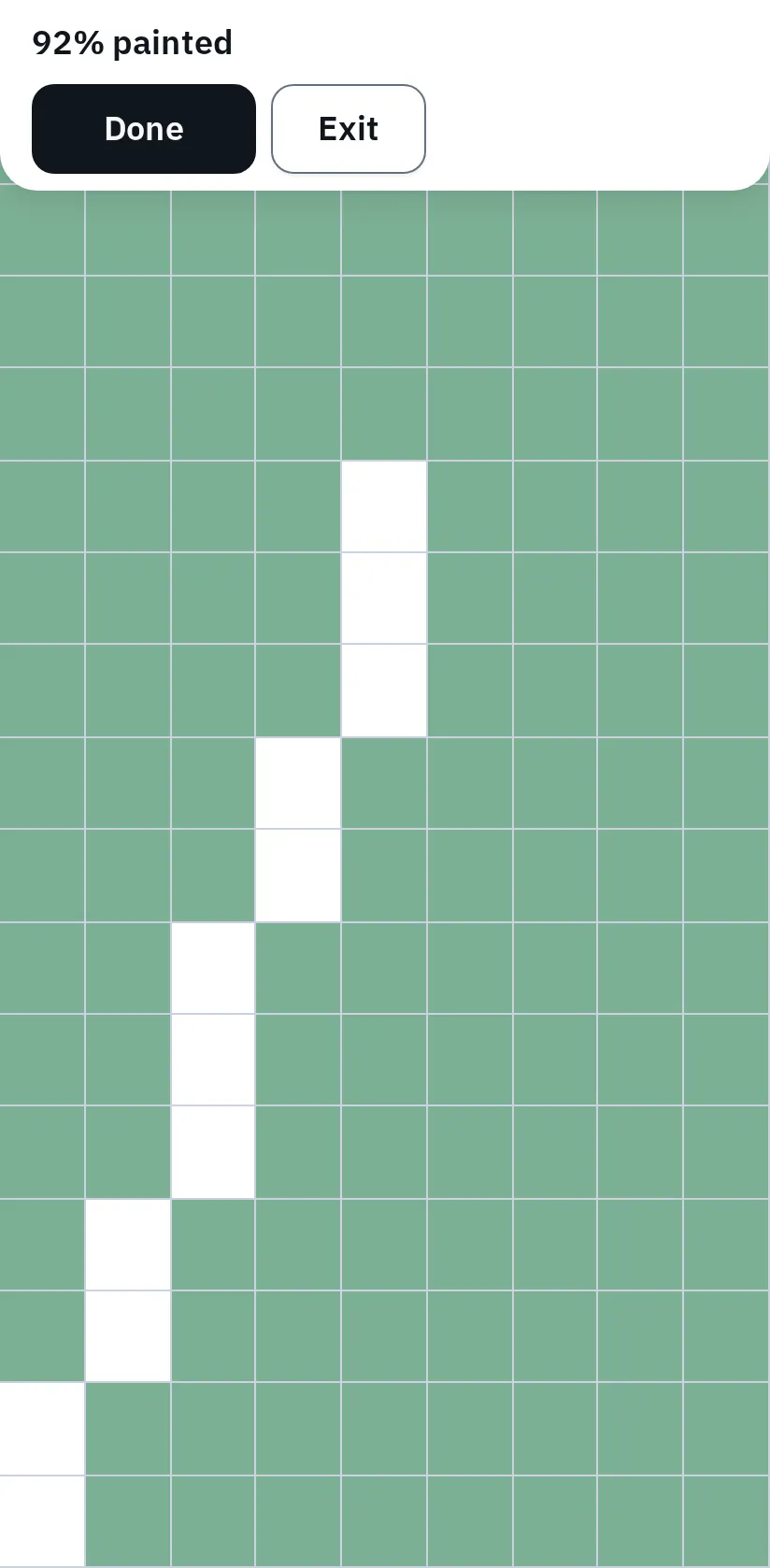
This example uses simulated touches in a phone emulator. Squares turn green where the page gets a touch; the white strip shows squares where it got none. The test then asks you to trace those squares again.
What the repair replaces
- A screen protector, if you use one. It can be replaced for a few dollars.
- The cover glass. This is what usually cracks.
- The display, with the touch layer. It shows the picture and feels your finger.
- The phone body.
On most phones, the glass and the display under it are glued together. A screen repair replaces them as one part.
That is why Apple lists one price for “screen damage”, whether only the glass cracked or the display broke too. Some independent shops offer glass-only repairs on some models. Ask what the quote includes and which parts the shop uses.
What a screen repair costs
The maker’s own prices for a new screen, in the US, out of warranty. We checked them on 5 November 2026. A shop or the maker may charge more after looking at the phone, for example if the frame is bent.
| iPhone | Apple’s price |
|---|---|
| iPhone 18 Pro Max, 17 Pro Max, 16 Pro Max, 15 Pro Max, 14 Pro Max | $379 |
| iPhone 18 Pro, Air, 17, 17 Pro, 16 Pro, 16 Plus, 15 Pro, 15 Plus | $329 |
| iPhone 16, 15, 14, 13 | $279 |
| iPhone 17e, 16e, 13 mini | $229 |
| iPhone 11, XR | $199 |
| iPhone SE (2nd and 3rd generation) | $129 |
| With AppleCare+, screen damage only | $29 |
| Samsung Galaxy | Samsung’s suggested price |
|---|---|
| Galaxy S26 Ultra | $289 |
| Galaxy S25 Ultra | $279 |
| Galaxy S24 Ultra | $259 |
| Galaxy S25 | $189 |
| Galaxy S24 | $174 |
| Galaxy S24 FE | $99 |
| Galaxy Z Fold7, inner / outer screen | $449 / $139 |
| Galaxy Z Flip7, inner / outer screen | $249 / $119 |
| With Samsung Care+, per claim | $29 |
With AppleCare+ or Samsung Care+, other damage, such as a bent frame, can change the fee. Your model isn’t listed? Use the price tool on Apple’s repair page or Samsung’s repair page. Samsung’s prices can vary by region and store, and taxes are extra.
Warranty and insurance
- The standard warranty doesn’t cover accidents. Apple’s and Samsung’s warranties exclude damage from a drop. A fault that wasn’t caused by an accident can be a warranty repair: ask the maker.
- AppleCare+ or Samsung Care+ covers accidental damage for the fee in the tables.
- Phone insurance from your carrier, bank or home insurance may cover it. Check the excess before you claim: it can be close to the repair price.
- Is it worth it? Compare the price with what your phone is worth. For an older phone, a new screen can cost more than the phone.
Maker or independent shop
The maker and its authorised shops use genuine parts. Independent shops often cost less, but may fit a display that isn’t genuine. Apple says a non-genuine display can show wrong colours or uneven brightness. After a repair, a phone may no longer be water resistant.
Until the repair
- Cover the cracks with a screen protector or strips of clear packing tape. Don’t use glue.
- Keep it dry. Apple says water resistance isn’t permanent and can drop after a knock. A crack lets water in more easily.
- Don’t press on the cracks or run your finger over them.
- Watch for changes. New lines, blots that grow or taps by themselves mean the display is getting worse: repair it now.
There is no home fix for a cracked screen. Toothpaste, glue and “crack repair” liquids can’t join broken glass.
Questions people ask
Can I keep using my phone with a cracked screen?
Apple and Samsung say to stop using it until it’s repaired, because broken glass can cut. Tape or a protector lowers the risk while you take it to the repair, but doesn’t remove it. Back up your phone.
Do cracks in a phone screen spread?
Often, yes. Small knocks, heat and pressure in a pocket can make a crack grow. Damage in the display under the glass can spread too.
Will a screen repair delete my photos?
A screen repair doesn’t normally touch your data, but back up anyway. If the repair goes wrong or the phone has to be replaced, you keep your photos.
My screen shows lines but the glass isn't cracked. What now?
That is a display fault, not glass damage. See lines on your phone screen.