Short answer
Learn to touch type. Rest your fingers on the middle row of keys and press each key with the same finger every time. Keep your eyes on the screen. Go for accuracy first, and practise a little every day. You will be slower for a while before you get faster.
Step 1: measure your speed now
Test it now
Typing test
Type for 1 minute and write down your speed and accuracy. It is your starting point. Test again the same way every week to see your progress.
Want to know if your speed is already good? See average typing speed.
What touch typing is
Touch typing means typing without looking at the keyboard. Each finger looks after its own keys, and returns to its home key after each press.
- The home row: your left fingers rest on A S D F, your right fingers on J K L ;.
- F and J have small bumps on most keyboards. Feel for them to find your place without looking.
- Your thumbs rest on the Space bar.
Each finger presses the keys in a slanted column above and below its home key. Your index fingers also reach one column towards the middle: the left one presses F, G, R, T, V and B.
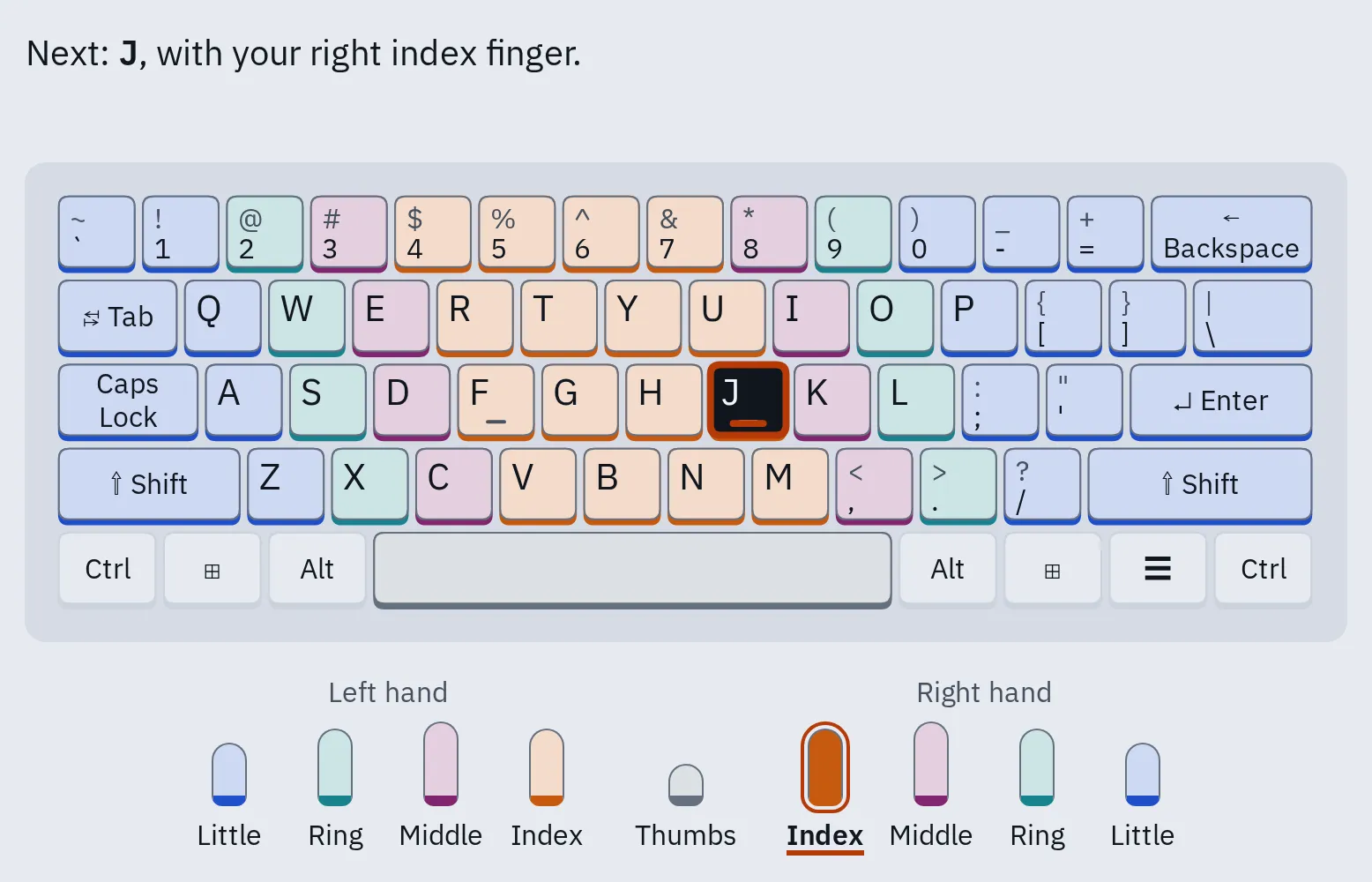
In our typing practice, each key has the colour of its finger, and the line above names the finger for the next key. The full finger table is on the typing practice page.
Learn it step by step
- Set up first. Sit with your feet flat. Keep your wrists straight and your elbows by your sides. See set up your desk.
- Start on the home row. Open lesson 1 of the typing practice. It starts with F and J only, then adds two keys at a time.
- Learn one row at a time. Pass each lesson before you move on. The lessons open the next one when you get 90% right.
- Don’t look down. If you forget a key, look at the keyboard picture on the screen, not at your hands. Feel for the bumps on F and J to find your place again.
- Slow down until you rarely make mistakes. Your speed will grow as you keep practising.
- Practise a little every day. Short sessions, such as 10 to 15 minutes, are easier to keep up than one long one. Stop and rest if your hands get tired.
- Use it for real typing. Once you know all the letters, touch type your emails and messages too, even if it feels slow.
- Test again every week with the same test length and keyboard.
Why not looking matters
Typing research gives three reasons to keep your eyes on the screen.
| What researchers found | What it means for you |
|---|---|
| Typists who looked at the keyboard more were slower. People who didn’t touch type looked at the keys about 41% of the time, touch typists about 20%. | Each look down costs time. |
| In an experiment, skilled typists had to think about which hand typed each letter. They slowed down and made more mistakes. | Once your fingers know the way, stop thinking about them. |
| Skilled typists were poor at saying where keys are, even though they pressed the right ones 5 to 6 times a second. | The skill lives in your fingers. Practise typing, not memorising a chart. |
Sources: Feit and others, 2016; Logan and Crump, 2009; Liu, Crump and Logan, 2010.
Three habits of fast typists
A 2016 study filmed the hands of 30 typists. Three habits went with faster typing, whether people had learnt touch typing or not. The study shows a link, not proof that each habit causes the speed.
The same finger for each key
Every time
Typists who always used the same finger for a key were faster. Pick one finger per key and stick to it, as touch typing does.
The next finger gets ready
Before the key
Fast typists moved the finger for the next key while still pressing the last one. Practice with real words trains this.
Quiet hands
Little movement
Fast typists moved their hands very little. Keep your hands over the home row and move only your fingers.
Fast typists also make fewer mistakes to fix, and they press the next key before letting go of the last one. Average typing speed explains both.
In the same study, some people who used fewer fingers were as fast as touch typists. So if you already type fast with your own method, you don’t have to start again. If you look at the keys a lot, touch typing is the way to get faster.
Set up your desk
A comfortable position lets you type longer without pain.
| Part | What to do |
|---|---|
| Wrists | Straight, in line with your forearms. Don’t bend them up or down. |
| Elbows | Close to your body, bent at about 90 degrees or a little more. |
| Keyboard height | About level with your elbows, or a little lower. |
| Keyboard feet | Fold them away if they make your wrists bend up. |
| While typing | Let your hands float. Rest them between bursts, on the heel of your palm, not your wrist. |
| Breaks | Take a short break every 30 to 60 minutes. |
From the OSHA computer workstation guide and Cornell University’s ergonomics guide.
Pain, tingling or numbness in your hands that doesn’t go away? See a doctor.
Shortcuts that save typing
Fixing a mistake is quicker when you delete a whole word at once.
| What it does | Windows | Mac |
|---|---|---|
| Delete the word before the cursor | Ctrl Backspace | Option Delete |
| Move one word left or right | Ctrl ← or → | Option ← or → |
| Type by speaking | Windows H | Fn D (or the dictation key) |
Typing faster on a phone
Touch typing is a skill for a real keyboard. On a phone, these built-in features help most.
iPhone and iPad
- Slide to type: touch the first letter, slide your finger to the next letters, and lift it at the end of the word.
- Full stop: double-tap the space bar to end a sentence with a full stop and a space.
- Shortcuts for phrases you type often: open Settings General Keyboard Text Replacement, then tap +. For example, “omw” turns into “On my way!”.
Android
- Glide typing: with Google’s Gboard keyboard, slide your finger from letter to letter instead of tapping.
- Voice typing: tap the microphone on the keyboard and speak.
- Other phone keyboards have similar features under their own names. Look in the keyboard’s settings.
Two thumbs are faster than one finger: see the phone figures in average typing speed. For a tablet, a Bluetooth keyboard lets you touch type.
Questions people ask
What is touch typing?
Typing without looking at the keyboard. Your fingers rest on the home row (A S D F and J K L ;), and each finger presses its own keys.
How long does it take to learn touch typing?
Learning where the keys are is the quick part. Getting really fast takes much longer: researchers say reaching expert speeds takes hundreds of hours of practice. You don’t need that to be faster than you are now.
Is it worth learning if I already type with two fingers?
If you type fast without looking, you may not gain much. In one study, some people who used fewer fingers were as fast as touch typists. If you look at the keys a lot, touch typing will help.
Why does F have a bump?
The bumps on F and J let you find the home row by touch, so you can keep your eyes on the screen.
Should I practise speed or accuracy?
Accuracy first. When typists in a study pushed themselves to go faster than their usual pace, they made far more mistakes. Fixing mistakes costs time, so a slower, accurate pace often gets you there sooner.