Short answer
Find your last return day first: many US shops give only 14 or 15 days, and some count from the day it arrived. Keep the box and everything in it. Test every part on day one, then use it as you normally would for a week: sleep, battery, heat and Wi-Fi. Write down anything odd, and decide a few days before the deadline.
There are five stops between the doorstep and the deadline. The early ones find faults that are there from the start. The week finds the ones that take time.
- The day it arrives: photos, check what’s in the box, keep the packaging.
- Day one: test every part with a checklist.
- The first week: use it as you will. Sleep and wake, a day on battery, heat, Wi-Fi, Bluetooth. Write down anything odd.
- A few days before the deadline: look again, then decide.
- The last return day. Start the return by then: most shops let you send it a few days later, Amazon wants it dropped off.
Find your last return day
Pick the shop and enter the dates. The planner works out the last return day from the shop’s rules in the table below, then puts a date on each check. Your dates and ticks stay in this browser on this device.
Took it home from the store? Enter the same day, or leave this empty.
Choose the shop and enter the day you bought it. The last return day shows here.
Nothing is sent anywhere, and there's no account. Clear your plan when you've decided.
Return windows at big US shops
The days below are for new electronics bought from the shop itself. Last checked: November 2026. Shops change these rules, often before the holidays, so check the shop’s own page. Your order or receipt shows your real date.
| Shop | Return window | Bought in the 2026 holidays | Fees and conditions |
|---|---|---|---|
| Amazon (sold by Amazon) | 30 days from delivery. Apple products: 15 days | Bought Nov 1 to Dec 31: back by Jan 31, 2027. Apple: Jan 15, 2027 | In the original box with all parts. Up to 50% off the refund if it’s damaged, has missing parts or looks used. Dropped off late: a fee of 20% of the price for the first 30 days, then 100% |
| Best Buy | 15 days from the day you receive it. Plus and Total members: 60 days. Phones and cellular tablets: 14 days (Verizon: 30) | Bought Oct 30 to Dec 31: back by Jan 15, 2027 (Plus and Total: Jan 31) | Opened phones and other cellular devices: $45 (not prepaid phones). Opened drones, cameras and projectors: 15%. No fee in some states. Bring all accessories and packaging |
| Walmart | Electronics and computers: 30 days from purchase, or from the day an online order arrives. Most phones: 14 days | Bought Oct 1 to Dec 31: back by Jan 31 (phones excluded) | Computers go back in the original box. Bundles go back together. Opened unlocked phones, drones and projectors: exchange only |
| Target | Electronics: 30 days. Apple, Beats and phones: 14 days. An online order counts from the day you receive it. Paid with a Target Circle Card: 30 extra days | Bought Nov 1 to Dec 24: back by Jan 24, 2027. Apple, Beats, unlocked and prepaid phones: Jan 8, 2027 | Opened phones: up to $35. Phones on a carrier contract: 14 days. The holiday dates name only unlocked and prepaid phones, and Circle Card days don’t apply to them |
| Costco | 90 days from the day you receive it, for TVs, projectors, computers, tablets, phones, smart wearables and cameras | No holiday change | Other products, such as monitors and headphones, fall under its general satisfaction guarantee: its page sets no window for them |
Bought from another seller on Amazon, Walmart or Best Buy (a “marketplace” seller)? Its own window and fees can apply, so follow the return steps in your order. Best Buy’s member days don’t apply to these sellers.
Bought a phone from Verizon, AT&T or T-Mobile, or on a contract through a shop? The carrier’s own window and fees apply, and they are often short. Returning the phone may not end the phone plan: Apple warns that you are still “responsible for your wireless service agreement”. Ask the carrier how to cancel.
A gift? The window counts from when it was bought or delivered, not from when it was opened. Ask the giver for a gift receipt: the refund is often store credit.
Return windows at maker stores
Bought straight from the maker’s own website? These are their windows, also checked in November 2026.
| Maker store | Return window | Bought in the 2026 holidays | Fees and conditions |
|---|---|---|---|
| Apple | 14 days from the day you receive it | Not announced when we checked. Look again in mid-November | Repack it with all its cords, adapters and papers. Engraved items and custom-built Macs can be returned, not exchanged |
| Dell | 30 days from the invoice date, which can be before it arrives | Bought Nov 1 to Dec 29: until Jan 15, 2027, or 30 days, whichever is later. Its page counts those 30 days from the invoice in one place and from delivery in another, so go by the invoice | No 15% fee for people buying for personal use. Original packaging, as new. Custom-built products can’t be returned |
| Microsoft Store | 60 days from the day you receive it | Bought Oct 1 to Dec 2: back by Jan 31, 2027 | Like new, in the original box with every part. At most 5 returns per purchase |
| Samsung | 15 days from delivery to ask for the return, then 15 more days to send it | None on its page when we checked | 5% fee on many products (laptops, tablets, Z phones, watches, earbuds, TVs, monitors). None on S and A phones, or if it’s faulty. Report damage within 5 days |
| Lenovo | 30 days from the invoice date | Ordered Nov 2 to Dec 13: back by Jan 27, 2027 | No fee inside the window. Original box with manuals, cables and adapters |
| HP | 30 days from delivery | Bought Nov 1 to Dec 25: back by Jan 15, 2027, or 30 days after delivery, whichever is later | No fee for people buying for personal use. Original packaging with every accessory. Report delivery problems within 10 days |
Bought a Dell or a Lenovo that took a week to arrive? Then a week of your window had gone before you opened it. At Dell, HP, Lenovo and Samsung you start the return on their website or by phone within the window, and they tell you how to send it.
The day it arrives: before you set it up
- The box and everything inside it: the trays, the bags, the card sleeves. Don’t write on it.
- The receipt or the order email. Save it as a PDF.
- The charger and every cable, even ones you won’t use.
- The small parts: the manual, the SIM tool, spare ear tips.
- Photos at unboxing: the serial label, every side of the device, the screen when it first turns on.
Keep all of it until the window closes. A return with a part missing can lose money, or be refused.
- Photograph the parcel before you open it, if it looks crushed or wet. Then the box, the seals and the device on every side.
- Check what’s in the box against the list on the box or in the manual.
- Compare the device with your order: model, colour, size, storage. The serial number on the box should match the one on the device.
- Look for damage in good light: dents, scratches, cracks, bent pins in ports. Report damage from delivery the same day, with your photos.
- Keep everything. Flatten nothing, cut nothing, throw nothing away until you’ve decided.
Day one: test every part
Install the system updates first and restart, so a fault that an update fixes doesn’t fool you. Then test each part with a checklist, not from memory.
Laptop
Test it now
Used laptop checklist
Choose New, just arrived. It takes you through 15 steps: specs against your order, screen, keys, trackpad, speakers, microphone, webcam, ports, Wi-Fi, battery and storage health, and signs of earlier use.
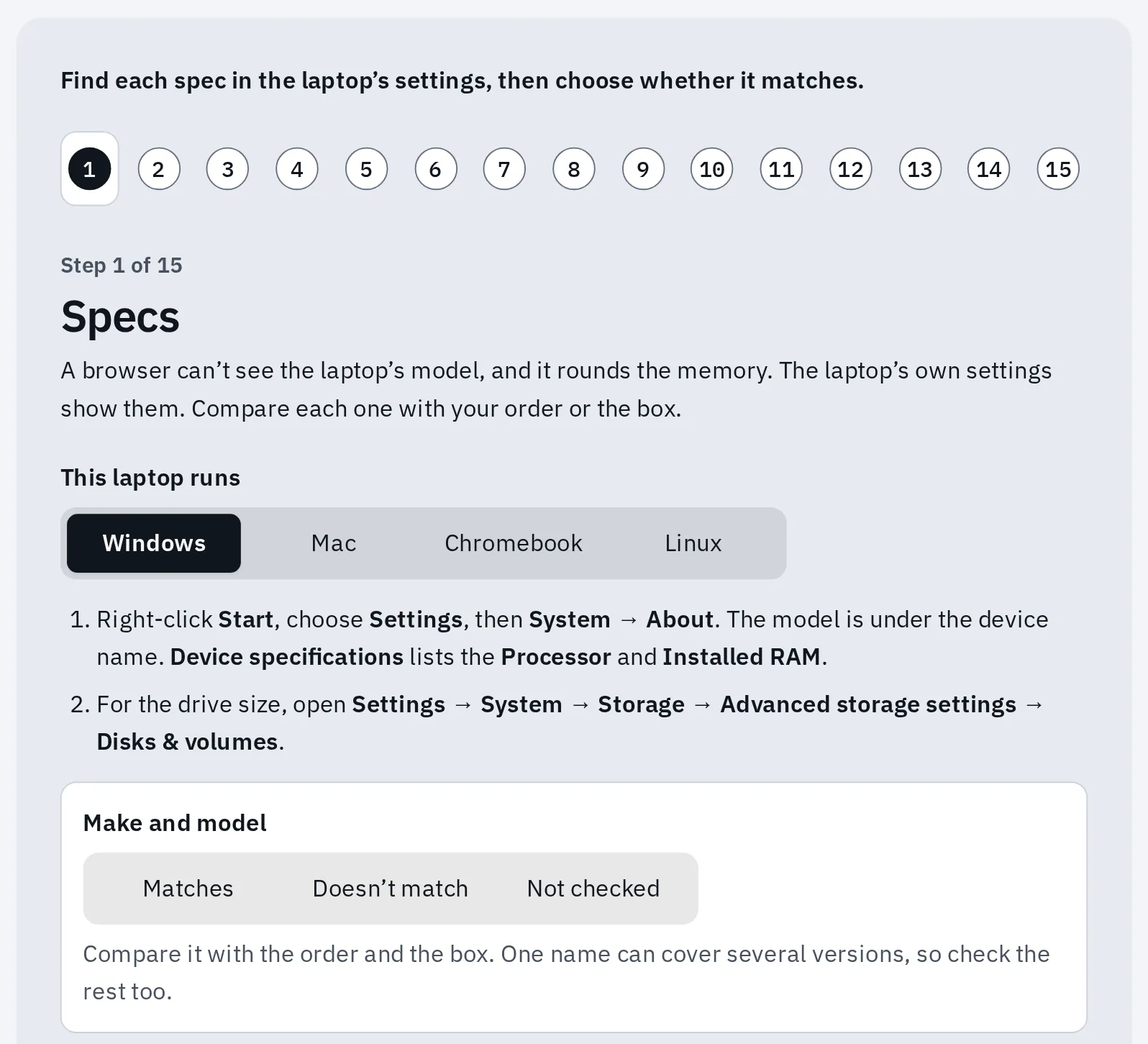
Step 1 of the new laptop check: compare the specs in Windows' own settings with your order.
A laptop that shows the setup screens when you first turn it on, and a battery close to new, are good signs. Battery health much lower than you’d expect for a new laptop, or specs that don’t match, are a reason to return it: where to read battery health.
Phone or tablet
Test it now
Used phone checklist
Open it in the phone’s own browser. It checks the screen, touch, buttons, speaker, microphone, cameras, vibration and motion sensors, then tells you where to read battery health.
A new phone’s battery health should be close to 100%: where to look on an iPhone. Make a real phone call too, on the speaker and at your ear, and try Face ID or the fingerprint reader a few times.
Monitor
Test it now
New monitor test
It takes about 5 minutes: dead pixels, light leaks, even brightness, the refresh rate and the resolution. Save the report: it helps if you return the monitor.
Warm the screen up for about 30 minutes first, at your usual brightness. A dot that bothers you is a reason to return it in the window, whatever the maker’s pixel policy says: dead pixel policies by brand.
TV
Open our tests in the TV’s own browser, or on a laptop plugged into the TV.
Test it now
Dead pixel test
It fills the screen with one colour at a time. A dot that stays dark or lit on every colour is a dead or stuck pixel.
Test it now
Backlight bleed test
Look in a dark room: light at the edges or cloudy patches on black. Some glow is normal on an LCD TV.
Then try each HDMI port with your own devices, every button on the remote, and the TV’s speakers at low and high volume. Watch a dark film scene and a fast sports match, as you will at home. Using it as a computer screen? See the TV settings that matter.
Accessories
Test each button and part once, then use it for a few days.
- Keyboard: press every key in the keyboard tester. A key that never lights up, and doesn’t work in other apps either, is a fault. So is a key that types twice.
- Mouse or trackpad: clicks, scrolling and dragging in the mouse test or the touchpad test.
- Controller: every button, trigger and stick in the controller tester. A stick should rest at the centre.
- Headphones or speakers: left and right in the sound test. With a microphone, the mic test.
- Webcam: the picture and its real resolution in the webcam test.
Days 2 to 7: use it the way you will
Some faults only show after hours or days: a laptop that won’t wake up, a battery that empties overnight, Wi-Fi that drops in one room. So use it as you normally would for a week, and check these on purpose.
| Check | How | A reason to return it |
|---|---|---|
| Sleep and wake | Let it sleep or close the lid each night. In the morning, open it and use it. | It won’t wake, wakes to a black screen, restarts, or Wi-Fi or Bluetooth don’t come back |
| Battery | One normal day on battery, after the first updates have finished. Write down the battery percent at the start and at the end, and how long you used it | It empties much faster than in similar use on your old device, or loses a lot overnight while asleep. The maker’s battery hours come from its own test, so expect less |
| Heat and fans | Do your heaviest job for 30 minutes: a game, a video call, a video export | It gets too hot to hold, the fan rattles or grinds, or it slows right down or shuts off |
| Charging | Charge it with its own charger, in each port that the maker says can charge. A phone that supports it: on a wireless charger too | Charging stops when you move the plug, or a charging port never charges |
| Wi-Fi | Use it in each room you will, at your busy times | It drops in places your old device didn’t. Record it with the internet stability test |
| Bluetooth | Pair your headphones, watch, mouse or car, and use them | They keep disconnecting, or the sound cuts out |
| Screen | Look at it in a dark room and in daylight | New dots, flicker, patches or lines |
A fan that is a bit loud under load can be normal. One that sounds wrong, or a laptop that shuts down when hot, isn’t: how to test laptop fans.
Write down anything odd
A fault that shows once a day won’t show in a shop in 5 minutes. So keep a short diary, and film the fault with your phone when you can.
| Date and time | What you were doing | What happened | Recorded? |
|---|---|---|---|
| Tue Nov 10, 7:40 AM | Opened the lid after the night | Black screen, restarted after 1 minute | Phone video |
| Thu Nov 12, 8:15 PM | Video call on battery | Fan very loud, call froze | Notes |
How to record a fault that comes and goes has more ways to catch one, and a report you can copy for the shop.
Before the last day: decide
Decide a few days before the deadline. At most shops you must start the return by the last day: on the website, by phone or at the store. Some then give you a few more days to send it. Amazon wants it dropped off by its return-by date, or a fee applies.
Sending it back
- Start the return with the shop by the last day, and follow its steps. A big TV may need a pickup: book it with the shop in time.
- Back up anything you made or saved on it.
- Sign out of your accounts. On an iPhone or iPad, sign out of your Apple Account in Settings your name Sign Out. On an Android phone, remove your Google account in Settings before the reset: Google says this turns off the phone’s protection, which would otherwise lock it for the next person.
- Erase it. iPhone: Settings General Transfer or Reset iPhone Erase All Content and Settings. Mac: Apple menu System Settings General Transfer or Reset Erase All Content and Settings. Windows 11: Settings System Recovery Reset PC, then Remove everything. Pixel: Settings System Reset options Erase all data (factory reset). Other Android phones have it in Settings too, under names that differ by maker.
- Take out your SIM card and memory card. Using an eSIM? Move it to your old phone first.
- Pack everything that came in the box, as it came. Take a photo of the open parcel before you close it.
- Keep the proof: the return receipt, the drop-off receipt or the tracking number, until the refund arrives.
Not erased? Some shops can’t take it back. Amazon and Walmart ask you to erase your data from computers and phones before a return. The full handover steps also cover sign-in codes, watches and the eSIM.
Questions people ask
Can I return a laptop or phone after I've opened and used it?
Usually yes, inside the window, if it’s in like-new condition with everything that came in the box. Some shops charge a fee for some opened items: Best Buy charges $45 for an opened phone, Target up to $35. At Walmart, an opened unlocked phone can only be exchanged. Amazon may take up to half off the refund if it’s damaged or looks used.
Does the return window start on the day I buy or the day it arrives?
Most shops count from the day it arrives. Dell and Lenovo count from the invoice date, which can be days before it arrives. Your order page or receipt shows the exact last day.
Do I get longer to return things bought for the holidays?
At many big shops, yes. In 2026, Amazon gives until Jan 31, 2027 for most things bought Nov 1 to Dec 31, and Best Buy until Jan 15, 2027 for things bought Oct 30 to Dec 31. Apple products and phones often get earlier dates. The table above lists each shop.
What should I test first on a new laptop?
The specs against your order, the screen, every key and the battery health: our laptop checklist does it in New laptop mode. Then use it for a week, including sleep, a day on battery and your heaviest job.
Is the return window the same as the warranty?
No. The return window is the shop’s, lasts days or weeks, and usually means a refund. The warranty is the maker’s, often lasts a year, and means a repair or a replacement for a fault.
One dead pixel on my new monitor or TV. Should I return it?
That’s your choice, and inside the window it’s yours to make. Look at it from where you sit for a day or two. After the window, the maker’s pixel policy decides: dead pixel policies by brand.