Short answer
This error usually means your player can’t unpack the way the picture or sound was packed: its codec. Try VLC, a free player with its own codecs. Or make an MP4 with H.264 picture and AAC sound, which most devices play. If no player opens the file, download or copy it again: it may be damaged.
A codec (coder-decoder) is the method that packs a video small and unpacks it again for playing. A video file usually holds a picture track and a sound track, each packed with its own codec. Some videos have no sound. If the player can’t unpack a codec, you get the error. Or the video plays with no picture or no sound.
- The file, or container: MP4, MOV, MKV or WebM. Its ending tells you the box, not what is inside.
- The picture, packed with a video codec such as H.264, HEVC, VP9 or AV1.
- The sound, packed with an audio codec such as AAC, Opus, Dolby Digital or DTS.
- The player: an app, a browser or a TV. It needs to read the box and unpack both tracks.
Step 1: see what this device can play
Test it now
Video codec test
It shows which video codecs this browser plays, though other apps on the same device can differ.
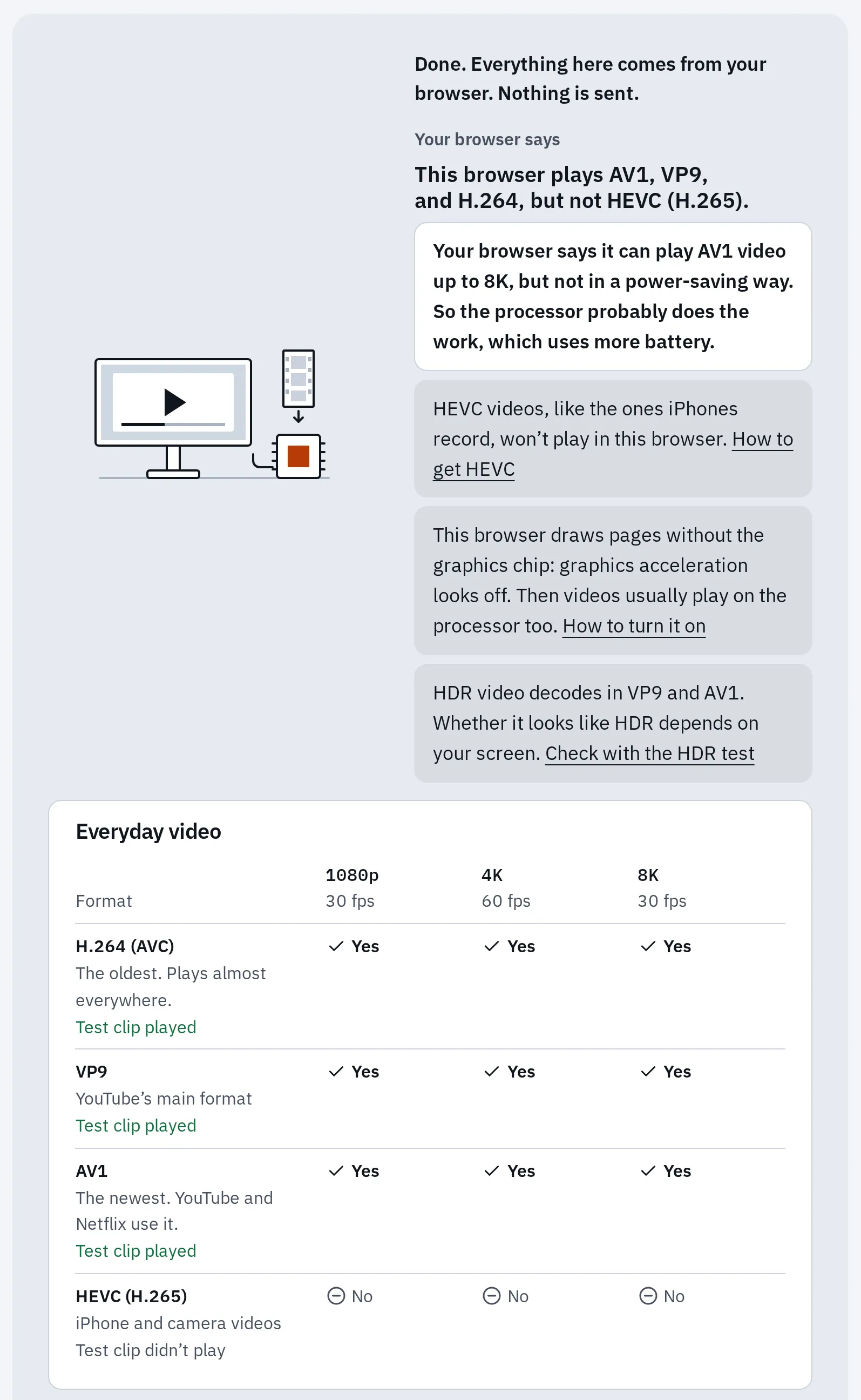
The codec test in Chrome on our Linux test computer: H.264, VP9 and AV1 play, HEVC doesn’t.
What did you see?
MKV, MOV, WebM and MP4 compared
| MP4 | MOV | MKV | WebM | |
|---|---|---|---|---|
| Made by | The MPEG group | Apple | The Matroska project | |
| Usual picture | H.264, HEVC or AV1 | H.264 or HEVC | Almost any | VP8, VP9 or AV1 |
| Usual sound | AAC | AAC | Almost any, often Dolby or DTS in films | Opus or Vorbis |
| Typical source | Android phones, downloads | iPhone and Mac videos | Films, TV episodes, OBS recordings | Browser and screen recordings |
| Plays on | Almost everything | Apple devices and VLC | VLC, Android, many TVs | Most browsers, Android |
WebM is a cut-down kind of MKV, made for the web. MP4 with H.264 and AAC is the safest choice when a video has to play on many devices.
Fix 1: play it in VLC
VLC is free, with no ads, from VideoLAN. It plays MKV, WebM, MOV and MP4 with its own codecs, so you don’t need codec packs. It also plays Dolby Digital and DTS sound. Get it from videolan.org, which links to the official version for your device.
Fix 2: convert it to MP4
Pick the converter for your file ending. Each one runs in your browser, so the video isn’t uploaded. It keeps one sound track and leaves out subtitles, so keep the original if you need other languages or subtitles.
- MKV to MP4 for films and recordings
- MOV to MP4 for iPhone and Mac videos
- WebM to MP4 for browser and screen recordings
Test it now
MKV to MP4 converter
It needs a browser that can read the original picture, and its notes say what was copied or made new.
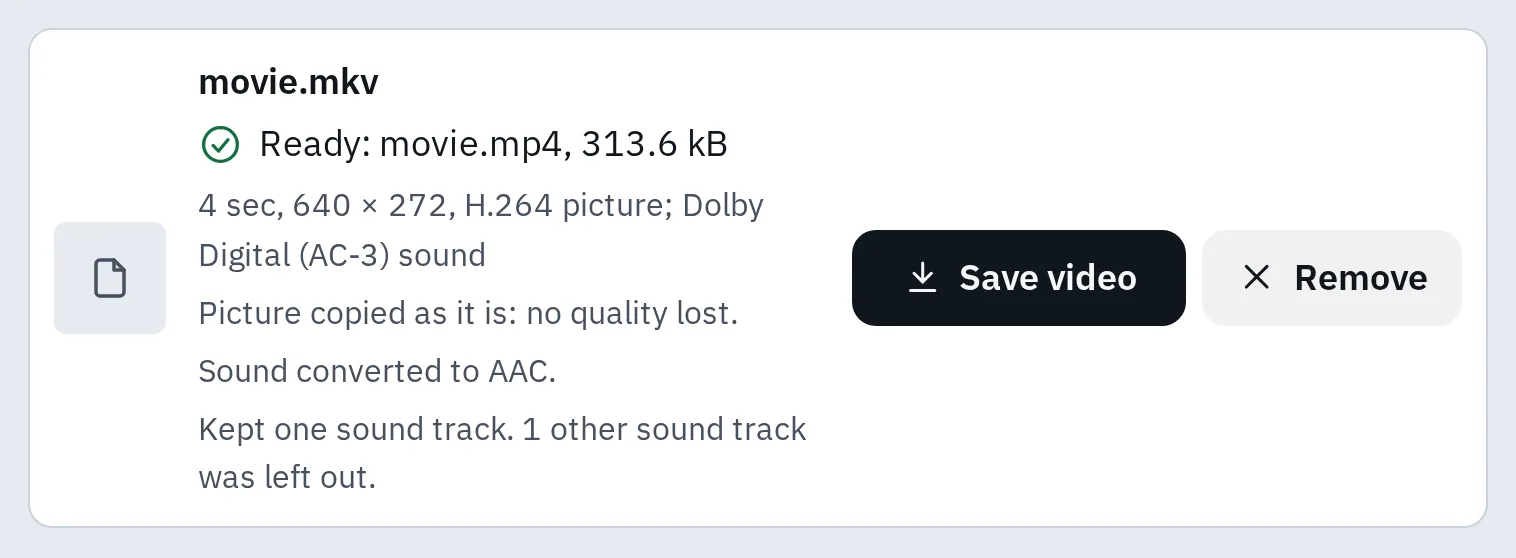
Our test film clip: the picture was copied as it is, and the Dolby sound became AAC.
Each converter offers two choices:
| Choice | What it does | When to use it |
|---|---|---|
| Keep as it is | Copies the picture into an MP4 without changing its quality, when the MP4 can hold it. The notes say if the sound changed or anything was left out. | The file won’t open, but the picture is H.264. |
| Most compatible | Turns other picture codecs, such as HEVC, into H.264. An H.264 picture is copied as it is. Slower, with a small loss of quality. | The MP4 still won’t play, or plays sound with a black picture. |
Sound but no picture
The picture codec may be one your player can’t unpack. Often it’s HEVC (also called H.265) or AV1. Both pack video smaller than H.264, but older devices and some apps can’t unpack them. The codec test shows which ones your browser plays.
Windows
Install Microsoft’s extension from the Microsoft Store, then play the video again:
- HEVC Video Extensions, $0.99 in the US. Some PCs already have the free HEVC Video Extensions from Device Manufacturer.
- AV1 Video Extension, free.
iPhone photos (HEIC) need this HEVC extension plus the free HEIF Image Extension: see what a HEIC file is.
Mac
Macs with macOS High Sierra or later play HEVC. In Safari, AV1 needs a Mac with an AV1 decoder chip, such as M3 Macs and later. On other Macs, try VLC.
iPhone and iPad
iPhones with iOS 11 or later play HEVC, the format they film in. In Safari, AV1 needs an AV1 decoder chip, as in iPhone 15 Pro and iPhone 16 and later. VLC is in the App Store.
Android
Android lists HEVC from Android 5 and AV1 from Android 10. Apps and the video settings they handle still vary. If the gallery shows a black picture, try VLC from Google Play.
Picture but no sound
First, unmute the player and turn the volume up. Play another video to check that sound works at all.
If other videos have sound, the sound codec may be the problem. Films in MKV files often carry Dolby Digital (AC-3 or E-AC-3) or DTS sound. Many apps can’t play them. VLC plays both.
To fix the file, convert it with MKV to MP4. It turns Dolby Digital into AAC, which most devices play. Our converter can’t convert DTS or Dolby TrueHD sound. Use VLC, or HandBrake, a free app for computers.
Phones and TVs
- iPhone and iPad: Apple says formats such as MKV may not open, and suggests an app that supports them. Use VLC from the App Store, or convert the file to MP4.
- Samsung and other Android phones: Android itself reads MKV and WebM, but the gallery app may still refuse a codec. Use VLC, or convert the file to MP4 on a computer.
- Mac: Apple also names MKV as a format that may not open in its apps. Safari on a Mac plays WebM from version 14.1. For other apps, use VLC or convert to MP4.
- Smart TV from a USB stick: each model has its own list in its manual. Samsung’s 2024 TVs, for example, list MKV, MP4 and MOV with H.264, HEVC, AV1 and VP9. If your file won’t play, convert it to MP4 with Most compatible.
To stop an iPhone filming in HEVC, see how to make an iPhone record videos that play on more devices.
Questions people ask
What is a codec, in simple words?
A way to pack a picture or a sound small, and to unpack it again. A video file usually has one for the picture and one for the sound.
Is MKV better than MP4?
Neither is better: both are boxes. MKV can hold more sound tracks and subtitles. MP4 plays on more devices.
Do I need a codec pack, such as K-Lite?
Usually not. VLC brings its own codecs, and Microsoft’s Store extensions add HEVC and AV1 to Windows. If you do install a pack, get it from its maker’s own website.
Does converting to MP4 lose quality?
Not with Keep as it is: the picture is copied. When Most compatible makes a new picture, it loses a little detail.
What is the difference between MP4 and MP3?
MP4 is a box for video and sound, MP3 is only sound. See MP3 vs MP4 vs M4A.