Short answer
Stick drift is a stick that sends movement when you don’t touch it. It is usually wear or dirt in the sensor inside the stick. Measure it first, then calibrate, clean round the stick and raise your game’s deadzone. If it still drifts, a warranty repair or a new stick is the real fix.
Step 1: measure the drift
Test it now
Stick drift test
Connect the controller and move both sticks in a full circle. Then let go and run the 5-second test. It shows how far each stick rests from the centre, as your browser reads it. Test again after each fix below.
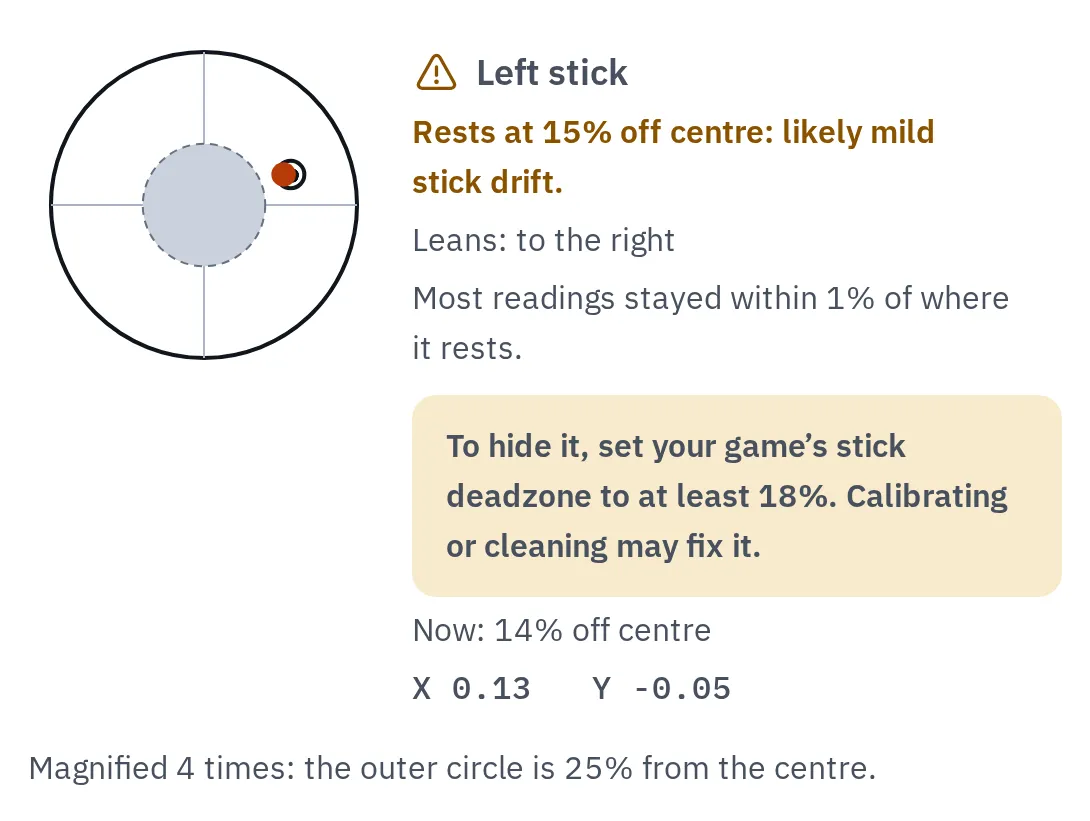
A drifting left stick: it rests 15% off centre, outside the dashed deadzone ring. The test suggests a deadzone to start from (here 18%).
What causes stick drift
- The gap round the stick: dust and grime get in here.
- Two sensors, one for left and right, one for up and down.
- Each sensor has a contact that rubs on a track. It wears most where the stick rests, so the sensor reads a little off centre.
Inside a thumbstick. Most sticks read their position with sensors that rub as you move them.
Wear is why drift comes back after cleaning, and why calibration can only hide it for a while. Sticks with Hall effect or TMR sensors measure with magnets, with no contacts rubbing in the sensor, so they don’t wear out the same way.
Fix 1: calibrate the stick
Calibrating teaches the controller where the centre is again. It helps with small drift. It can’t repair a worn sensor.
Switch
- Open System Settings Controllers and Sensors, then Calibrate Control Sticks.
- Tilt the drifting stick in any direction for a few seconds to choose it.
- If the cross doesn’t sit in the middle, press X to calibrate and follow the screen: push towards each arrow, then turn the stick round fully a few times.
A Joy-Con held sideways on its own can’t be calibrated: hold it upright or attach it.
Switch 2
- Open System Settings Controllers & Accessories, then Calibrate Control Sticks.
- Tilt the stick fully in any one direction for a few seconds, then follow the screen.
Nintendo asks you to calibrate only when there is a problem.
Xbox
Open the Xbox Accessories app on an Xbox or a Windows PC, choose your controller and use its recalibration tool for the sticks. It works on the Xbox Wireless Controller and the Elite Series 2. Microsoft says it can’t fix drift from normal wear.
PS5
The PS5 has no stick calibration. Its controller settings cover only volume, vibration, triggers and similar. Go on to cleaning and the deadzone.
Keep the controller up to date: Settings Accessories Controller (General), then DualSense Wireless Controller Device Software.
Windows PC
Search the Start menu for Set up USB game controllers. Choose your controller, then Properties. If it has a Settings tab with Calibrate, follow the steps. Not every controller offers it.
Steam
In Steam, open Settings, then Controller, choose your controller and open its calibration settings. This only changes games that use Steam Input, so check it in a game: the browser test won’t show it.
Run the stick drift test again. If the reading dropped, you are done for now.
Fix 2: clean round the stick
- Turn the controller off.
- Gently brush round the base of the stick with a clean, dry toothbrush. Nintendo gives this advice for Joy-Con sticks that catch or stick.
- Wipe the outside with a soft, dry cloth.
- Turn it on and test again.
Fix 3: raise the deadzone
A deadzone is a small circle round the centre that a game ignores. Set it a little bigger than your drift and the movement stops. This hides the drift, it doesn’t fix it, and aiming gets a little less exact.
- Read the deadzone the stick drift test suggests under the stick, for example 18%.
- In your game, open the controller settings and find deadzone or dead zone for that stick.
- Try that value first. Some games write 18% as 0.18. Games count deadzones differently, so raise it one step at a time until the movement stops.
The standard PS5 and Xbox controllers have no system-wide deadzone, so this is set per game. The DualSense Edge has one: open Settings Accessories DualSense Edge Wireless Controller, then Custom Profiles. Create or edit a profile, set Stick Sensitivity/Deadzone, then switch the controller to that profile.
Fix 4: warranty, repair or a new stick
If the drift is over 15%, keeps coming back or the stick moves during the test with nobody touching it, the sensor is likely worn.
Warranty claim
First, if it still runs
Sony gives 1 year on PS5 controllers in the US and Canada; Nintendo gives 12 months in the US. Make a dated report with the controller drift warranty check before you send it in. A short video of the drift helps too.
Nintendo Joy-Con repair
EEA, UK and Switzerland
For original Joy-Con bought there, Nintendo repairs drift at no charge until further notice, even after the warranty. Its conditions apply. Elsewhere, Nintendo services Joy-Con that calibration can’t fix: check its support site for the cost.
New stick or controller
After the warranty
A repair shop can replace the stick (it needs soldering). DualSense Edge stick modules are sold separately and slide out without tools. Hall effect or TMR sticks don’t wear the same way.
The stick reads normal
The test shows 5% or less and the stick stays still, but something still moves in a game. A small reading can still matter if the game uses no deadzone:
- Another button or a second controller may be pressed. Check every button in the controller tester.
- The game’s own deadzone is 0, or its stick sensitivity is very high. Reset its controller settings.
- A remapping app such as Steam Input changes the stick before the game gets it. Try the game with it turned off.
Questions people ask
Can stick drift fix itself?
Drift from dirt can go away after you move the stick round a lot or clean it. Drift from a worn sensor comes back and gets worse. Test now and again in a few weeks to see which yours is.
Does calibration fix stick drift?
It helps with small drift, because the controller learns a new centre. It can’t fix a worn sensor. Nintendo and Xbox offer calibration; the PS5 doesn’t.
Is stick drift covered by the warranty?
Usually, while the warranty runs, but the maker decides each claim. In the EEA, the UK and Switzerland, Nintendo repairs drifting Joy-Con at no charge until further notice. See the warranty check for what to send.
Why does the test show 0% when my stick drifts?
Chrome and Edge show a stick as 0 until it has once been near the centre. Move both sticks in a full circle, then test again. iPhone and iPad add their own small deadzone, so test on a computer.
Do new controllers get stick drift?
They can, but a new stick usually rests within a few percent of the centre. Test a new controller when you get it, so you have a reading to compare with later.