Short answer
Surround sound works when four things agree: the source sends surround, the cable carries it, the receiver or soundbar knows your speakers, and the speakers stand round you. Plug the source into the receiver’s HDMI input, or use the TV’s eARC port. Optical carries 5.1 only as Dolby Digital or DTS; plain ARC adds Dolby Digital Plus. Then run the receiver’s automatic setup and check each speaker.
Find your path
5.1 means five speakers round you plus a subwoofer (the .1). 7.1 adds two behind you. 5.1.2 adds two height speakers above you, for Dolby Atmos or DTS:X.
Pick what plays the sound, how it reaches the receiver or soundbar, and which of the two you have. You see what the path can carry, and what to set, in order. A streaming stick plugged into the TV counts as the TV’s apps. Place the speakers first: step 1 below shows where.
What this path can carry
- Stereo (2 channels)Can pass
- 5.1 in Dolby Digital or DTS: DVDs, TV, many streamsCan pass
- 5.1 and 7.1 uncompressed (PCM): computers and consolesCan’t pass
- Dolby Atmos from streaming appsCan pass
- Dolby Atmos, DTS:X and lossless 7.1 from Blu-ray discsCan’t pass
Can pass: the path carries it, if every box on the way supports that format. Sometimes: it depends on the app, the model or a setting, as the steps say.
Do these, in this order
- Use the TV’s eARC port. Connect the TV’s port labelled eARC to the receiver’s HDMI OUT marked eARC or ARC, or to the soundbar’s eARC port. On the TV, choose the receiver as the sound output, turn on eARC, and set the digital format to Auto, not PCM. A box plugged into an LG TV: Pass Through lets uncompressed 5.1 through. The TV settings, by brand
- Tell the receiver which speakers you have. Height or back speakers? First assign them: Amp Assign (Denon), Power Amp Assign (Yamaha). Then turn on the speakers you have and turn off the rest: Yes or No on Denon, Small, Large or None on Yamaha. Turn the subwoofer on only if one is connected. For sound from the TV, choose the TV Audio input (Denon). Menu names by brand
- Run the automatic setup. Put its microphone at ear height on your main seat and start Audyssey (Denon), YPAO (Yamaha), AccuEQ or Dirac Live (Onkyo). It sets each speaker’s distance and level, and the crossover.
- Pick a surround soundtrack. The TV sends on what the app plays. In Netflix, open Audio & Subtitles and look for 5.1 next to the language. No 5.1 there: the show is stereo, or surround is off on the TV.
- Choose a mode that keeps the channels. For films and games, let the receiver pick the decoder: Dolby, DTS or Multi Ch In (Denon), Straight (Yamaha). To spread a stereo show over every speaker, use Dolby Surround or Neural:X. Avoid Multi Ch Stereo and All-Channel Stereo while you check. The modes by brand
- Check the speakers, then the source. A test tone checks the speakers and their wires: Denon Levels, Test Tone Start; Yamaha Test Tone. Then play a film you know has surround, and see which format the receiver or soundbar says it gets, on its display or in its app. What to listen for
What each connection can carry, from the makers’ own tables (Dolby, HDMI Licensing, Sony, Sonos, LG). Each box on the way must support the format too: the source, the TV and the receiver or soundbar.
| Connection | Stereo | 5.1 Dolby Digital or DTS | 5.1 and 7.1 PCM | Atmos from streaming | Atmos, DTS:X from discs |
|---|---|---|---|---|---|
| HDMI into the receiver | Yes | Yes | Yes | Yes | Yes |
| TV’s eARC port | Yes | Yes | If the TV passes it on | Yes | If the TV passes it on |
| TV’s ARC port | Yes | Yes | No | Often (Dolby Digital Plus) | No |
| Optical | Yes | Yes | No | No | No |
| One headphone or RCA cable | Yes | No | No | No | No |
| Bluetooth | Yes | No | No | No | No |
PCM is sound that isn’t packed: computers and consoles send it. Dolby Digital and DTS pack 5.1 small enough for optical and ARC; ARC also takes Dolby Digital Plus. Some TVs turn sound the cable can’t carry into a format it can: LG’s, for example, sends Dolby Digital over optical. Others don’t pass it on at all.
1. Place the speakers
Put every speaker at the same distance from your seat, if you can, at about ear height. Dolby gives that as about 1.2 m (3.9 ft) from the floor, for a seated adult. Turn each speaker to face you. Left and right are as you sit, facing the screen. A rule of thumb for the front pair: at 30 degrees, they are as far apart as each is from you.
- Centre speaker: straight ahead, under or over the screen.
- Front left and right: 22 to 30 degrees to each side.
- Surround left and right: 110 to 120 degrees, beside you and a little behind.
- Subwoofer: near the front to start. Bass is hard to place by ear, so the spot is free.
- Your seat. Every speaker the same distance away, where you can.
5.1, from above. The angles are Dolby's, measured from straight ahead at your seat.
- Front left and right, each side of the centre
- 22–30 °
- Surrounds in 5.1
- 110–120 °
- Ear height, seated (3.9 ft)
- 1.2 m
Can’t get them the same distance away? That’s fine: the receiver delays the nearer ones, so every sound arrives together (step 3). Sofa against the back wall? Put the surrounds beside you, on the side walls.
7.1 and height speakers (Dolby Atmos)
- Side surrounds: 90 to 110 degrees, beside you.
- Rear surrounds: 135 to 150 degrees, behind you.
- Overhead speakers (the .2 in 5.1.2): 65 to 100 degrees up, where 90 is straight overhead. So a little in front of your seat, or just above it.
- Or upward-firing (Atmos-enabled) speakers on top of the front speakers, bouncing sound off a flat ceiling.
- Ear height: the speakers around you sit level with your ears.
Left: 7.1 from above. Right: height speakers from the side, on the ceiling or bounced off it.
- Sides and rears in 7.1. Dolby puts the side pair at 90 to 110 degrees and the rear pair at 135 to 150 degrees. In Atmos layouts with only one pair round you (5.1.2, 5.1.4), that pair goes at 90 to 110 degrees too.
- Ceiling speakers. Mount them in line with the front left and right, two to three times as high as the ear-height speakers. Two of them (5.1.2) go a little in front of your seat. Four (5.1.4) go in front and behind: about 45 degrees up each way.
- Upward-firing speakers. Dolby needs a flat, hard ceiling (plaster, drywall or wood), not sloped, between 2.3 and 4.3 m high (7.5 to 14 ft). They sit at or a little above ear height, at least 0.9 m (3 ft) from anyone. Each one needs its own speaker wire.
The subwoofer has its own placement trick, the subwoofer crawl: see where to put a subwoofer.
2. Connect everything
- HDMI from the source into the receiver’s HDMI IN: picture and every sound format.
- HDMI from the receiver’s HDMI OUT to the TV: the picture goes on to the TV.
- HDMI from the source into the TV, if the receiver can’t pass on the picture you need.
- HDMI from the TV’s eARC (or ARC) port to the receiver or soundbar: the sound comes back out.
- Or an optical cable: 5.1 as Dolby Digital or DTS, no more.
Top: the source goes into the receiver, which carries every format. Bottom: the TV sits in the middle and sends the sound on.
Source into the receiver
Best sound
The cable can carry every format, from any source. The receiver must pass on the picture you use, such as 4K HDR or 120 Hz. Many soundbars have no HDMI input: then use the TV route. Apple notes some receivers and soundbars take Atmos but not Dolby Vision or HDR10.
Source into the TV, then eARC
Simplest
One cable to the receiver, and the TV’s own apps get surround too. eARC can carry everything, if the TV passes it on. Plain ARC carries 5.1 as Dolby Digital or DTS, and often Atmos from streaming apps.
Games at 4K and 120 Hz? Keep the console on the TV and use eARC: then only the TV must handle the fast picture. The Atmos from PS5 and Xbox games needs eARC or HDMI into the receiver: plain ARC can’t carry it. See sound with a TV as a monitor.
Set the TV to pass the sound on
Use the TV’s HDMI port labelled eARC or ARC: only one port has it. Then change these in the TV’s sound settings.
- Choose the receiver or soundbar as the sound output. LG: Sound, Sound Out, Use Wired Speaker, HDMI(ARC) Device (or Optical Out Device). Samsung: Sound, Sound Output.
- Turn on eARC, if both have it. LG: Sound, Advanced Settings, eARC Support. Samsung: Sound, Expert Settings, HDMI-eARC Mode. On a Denon receiver, eARC works by itself; for ARC, set ARC to On. ARC also needs HDMI control (CEC) on the TV: LG calls it SIMPLINK (HDMI-CEC), in General, External Devices, HDMI Settings. Then choose the receiver’s TV Audio input (Denon) or TV (Yamaha).
- Set the digital format to Auto, not PCM. PCM sends uncompressed stereo. LG: Sound, Advanced Settings, Digital Sound Output (Auto or Pass Through). Samsung: Sound, Expert Settings, Digital Output Audio Format: Auto; its Pass-Through works only for a box on an HDMI input, with eARC.
- A box plugged into the TV? LG: set Select HDMI Input Audio Format to Bitstream for that input. Samsung: turn on Dolby Atmos Compatibility for Atmos from it, with the format on Auto.
Turn on HDMI control (CEC) on the TV too. Sony’s HT-A7000 soundbar needs the TV’s Control for HDMI on, or the TV’s sound doesn’t reach it. Sonos adds that CEC works over the HDMI ARC port, not over optical.
3. Set up the receiver or soundbar
AV receiver
Wire each speaker to the receiver’s matching terminals, red to red and black to black. Then:
- Assign the amplifiers, if you have height or back speakers: Amp Assign on Denon, Power Amp Assign on Yamaha. Pick the layout that matches your speakers.
- Tell it which speakers you have. Turn on each one you have (Denon: Yes; Yamaha: Small or Large) and turn off the rest (No or None). Set Subwoofer to Yes only if one is connected. If it asks for a size, choose Small for most speakers when you have a subwoofer: their deep bass then goes to it.
- Run the automatic setup. Put the microphone at ear height on your main seat; Yamaha suggests a tripod. Keep the room quiet: it plays loud test tones. Then move the microphone to the next spots it asks for. On Denon, keep them within 60 cm (2 ft) of the first.
- Check what it set. The crossover hands deep bass to the subwoofer; Denon and Yamaha start at 80 Hz. Distances delay the nearer speakers so sound arrives together. Levels make every speaker equally loud at your seat.
- Choose a sound mode that keeps the channels, as in the table below.
| Denon | Yamaha | Onkyo | |
|---|---|---|---|
| Speakers | Setup menu: Speakers, Manual Setup, Speaker Layout | Setup menu: Speaker, Configuration | Setup menu: speaker settings |
| Automatic setup | Audyssey Setup, up to 8 microphone spots | YPAO, Multi Measure up to 8 microphone spots | AccuEQ, or Dirac Live in the Onkyo Controller app |
| Every day: plays the channels as they come | The Dolby or DTS mode it picks, Multi Ch In for PCM | Straight | Direct |
| Only for checks: no room correction | Direct, Pure Direct | Pure Direct | Pure Audio |
| Spreads stereo over every speaker | Dolby Surround, Neural:X | Surround Decoder: Dolby Surround, Neural:X | Dolby Audio - Surr, Neural:X |
| Same stereo on every speaker (avoid while testing) | Multi Ch Stereo | All-Channel Stereo | AllCh Stereo |
Menu names come from the Denon AVR-X1800H, Yamaha RX-V6A and Onkyo TX-RZ30 manuals; other models may differ a little. On Denon, Direct and Pure Direct turn Audyssey’s room correction off, so keep them for checks. Dirac Live comes with the Onkyo TX-RZ30; on the Denon AVR-X3800H it needs a paid licence.
Soundbar
Many soundbars have no HDMI input: then the source goes into the TV, and the TV sends the sound on by eARC or ARC.
- Pair the rear speakers and subwoofer. Most pair by themselves, or with a button on the back: see your model’s manual. Sonos: Set up Surrounds and Connect Sub in the Sonos app.
- Run the room tuning, if it has one. Trueplay on Sonos measures how sound bounces in your room. Bose has ADAPTiQ on the Smart Ultra Soundbar.
- Know what plays where. Without rear speakers, the soundbar plays the surround channels from the front. On a Sonos with Atmos, Height Audio sets the height effects.
A soundbar with Atmos over plain ARC plays most streaming Atmos (Dolby Digital Plus), says Sonos. Lossless Atmos from discs (Dolby TrueHD) needs eARC.
4. Set the source to send surround
Most boxes send surround by themselves over HDMI into a receiver. Computers and consoles often start in stereo. Over ARC and optical, uncompressed 5.1 can’t pass, so a box must send Dolby Digital or DTS instead.
Windows
Make the receiver or HDMI output the default, press Configure and choose 5.1 Surround or 7.1 Surround: the steps are in only 2 channels found.
For Atmos, install Dolby Access from the Microsoft Store. Then open Settings System Sound, select the receiver under Output, and choose Dolby Atmos for home theater next to Spatial sound.
Netflix plays 5.1 on a computer only in Microsoft Edge or the Netflix app, on Windows 10 or later.
Mac
- Open Audio MIDI Setup (in Applications, Utilities).
- Select the HDMI or receiver output, and set its format to 6 or 8 channels.
- Choose Configure Speakers.
- Under Configuration, choose 5.1 Surround. For the usual 7.1 (three speakers in front, four around you), choose 7.1 Rear Surround. Apple’s 7.1 Surround is for five speakers in front.
- Check the Channel of each speaker, and press its Test button.
- Choose Apply.
A Mac with Apple silicon can also pass Dolby Digital, Dolby Digital Plus and its Atmos on untouched, from Apple Music, QuickTime Player and the TV app. Turn on Prefer HDMI Passthrough for the HDMI device.
PS5
- Open Settings Sound Audio Output.
- Into a receiver: set HDMI Device Type to AV amplifier, and choose your speakers in Number of Channels.
- For an Atmos receiver or soundbar, choose Dolby Atmos in Audio Format (Priority). PlayStation added it in a September 2023 update, first for games.
The disc player app has its own audio settings, says PlayStation. On plain ARC, pick a Dolby format there instead of Dolby Atmos: the Atmos from games needs HDMI into the receiver, or eARC.
Xbox Series X|S
- Press the Xbox button, then open Profile & system Settings General Volume & audio output.
- Set HDMI audio to 5.1 uncompressed or 7.1 uncompressed, for a receiver on HDMI. Leave Stereo uncompressed for a stereo setup.
- For Atmos or DTS:X, or over ARC, choose Bitstream out, then a Bitstream format: Dolby Atmos for home theater or DTS:X for home theater for those systems.
- More choices are under Advanced. Audio testing & details there shows which formats your setup supports.
The Xbox Series X|S has no optical port. Microsoft says to plug the console into the TV, and the TV’s optical out into the receiver.
Apple TV 4K
Open Settings Video and Audio Audio Format:
- Auto (recommended) sends the best format your equipment takes. Turn on Dolby Atmos for an Atmos system.
- Convert to Dolby Digital 5.1: for ARC or optical, which can’t carry uncompressed 5.1.
- Stereo Only: only for a stereo setup.
- Continuous Audio Connection off lets the receiver spread stereo over every speaker.
For Atmos, Apple says to plug the Apple TV 4K into the receiver or soundbar: its Atmos doesn’t work over ARC, and most TVs don’t pass Atmos on.
TV apps
The TV passes on what the app plays. In Netflix, open Audio & Subtitles while a show plays, and look for 5.1 next to the language. Netflix shows 5.1 when the device, the sound system and the title all support it.
No 5.1 there? Set the TV’s digital format to Auto, in the TV’s sound settings.
A Blu-ray player: choose Bitstream in its audio settings, so the receiver decodes the disc. Over HDMI, PCM gives 5.1 or 7.1 too, but Dolby says Atmos played as PCM becomes 7.1 at most.
5. Check every speaker
From a computer, our surround test plays a sound on one speaker at a time. You say where you heard it. It first shows how many channels the computer gives the page.
Test it now
Surround sound test
Hearing each sound from the right speaker shows that the computer, the cable and the receiver pass every channel to the right place.
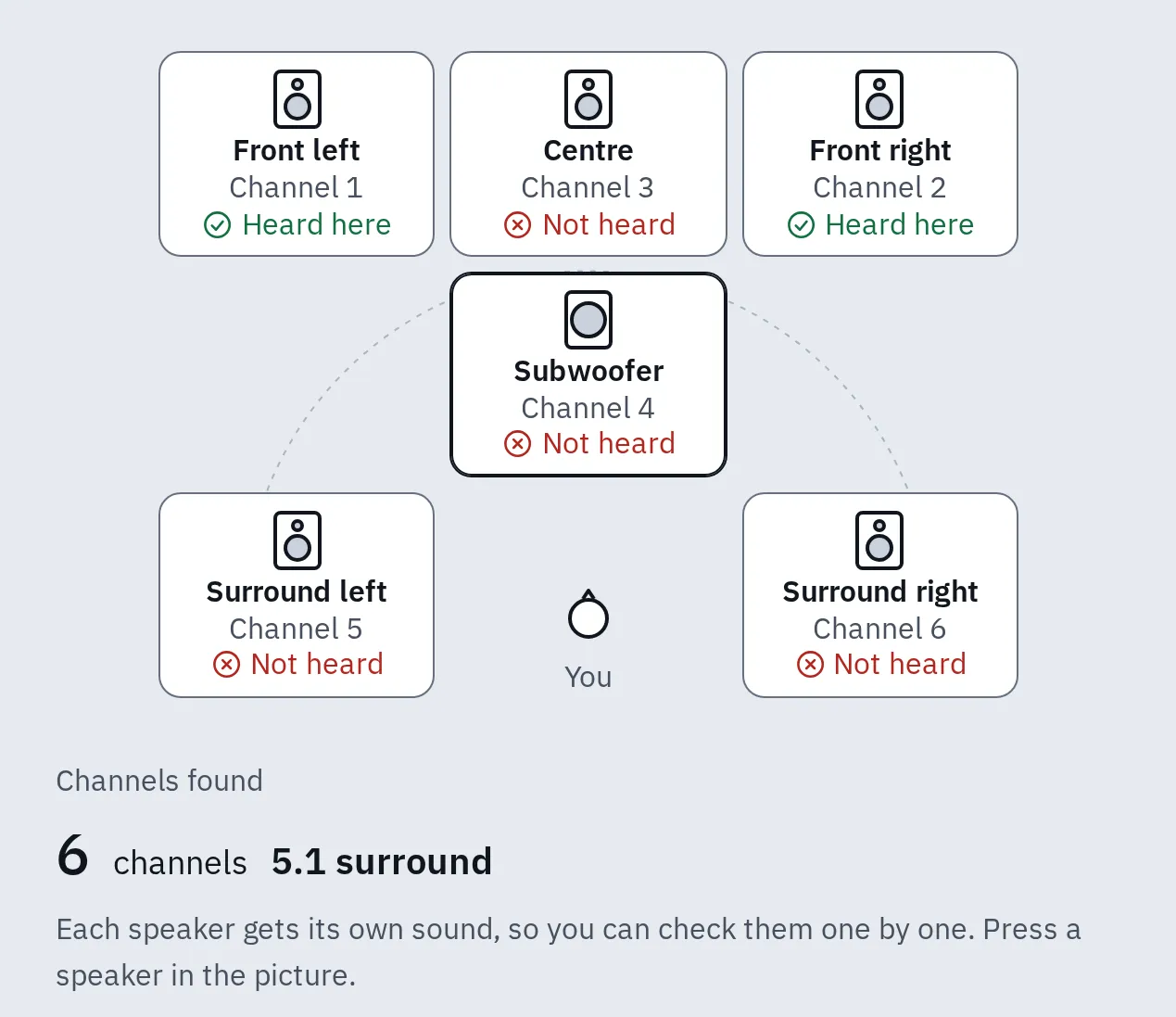
6 channels reach the page, but only the front pair played: the receiver is in a stereo mode, or the other speakers are off in its setup.
A console, Apple TV or TV app can’t run our test. Play the receiver’s own test tone instead (Denon: Levels, Test Tone Start; Yamaha: Test Tone), and walk round the room. A test tone checks the speakers and their wires, not the source. So then play a film you know has surround, and see which format the receiver or soundbar says it gets, on its display or in its app. To check the bass on its own, use the bass test’s Subwoofer check.
Why it still plays stereo
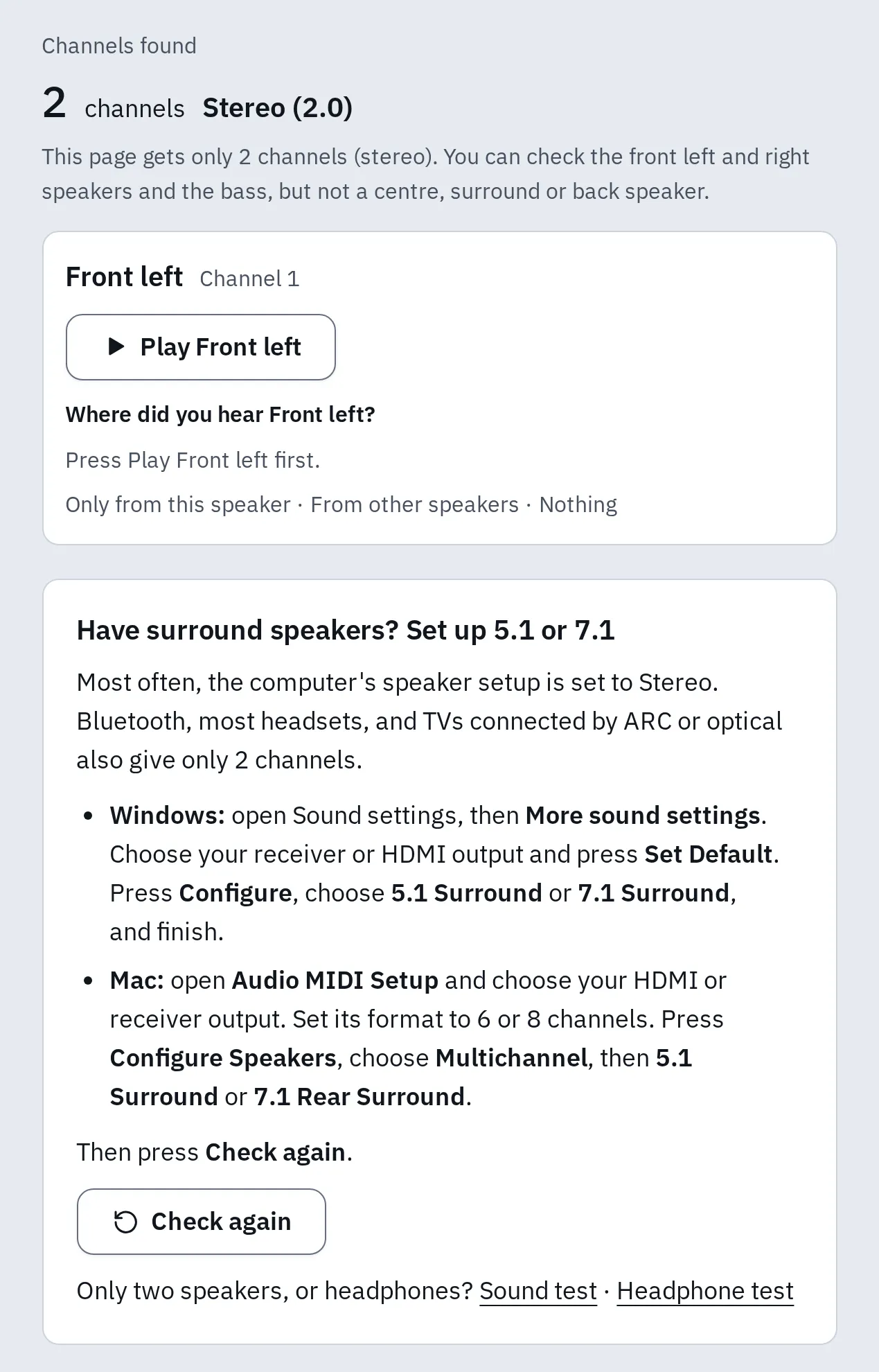
Only 2 channels reach the page. Our test says why, and how to set up 5.1 or 7.1.
Most likely first:
- The show is stereo. Many streams, news and older shows have only two channels. Try a film you know has 5.1, and check the app’s audio menu.
- The source is set to stereo. Windows is often set to Stereo, an Xbox to Stereo uncompressed, an Apple TV to Stereo Only. See step 4.
- The TV sends PCM. Its digital format is on PCM, which is stereo. Set Auto: see the TV settings.
- The connection can’t carry uncompressed 5.1. A computer or console on ARC or optical sends stereo PCM. Plug it into the receiver’s HDMI input, or set the source to send Dolby Digital or bitstream. With eARC, the TV must pass uncompressed surround on: on LG, set Digital Sound Output to Pass Through.
- The receiver is in a stereo mode. Choose the decoder it picks itself, or Straight. See the mode table.
- A web page gets only what the system gives it. Phones, tablets, Bluetooth speakers and most headsets give web pages 2 channels. Safari may too. On a computer, Netflix plays 5.1 only in Edge or its Windows app.
Questions people ask
Do I need a receiver for surround sound?
You need something that decodes surround and drives each speaker: an AV receiver, or a soundbar with rear speakers. A TV on its own can’t drive separate surround speakers. A soundbar without rear speakers plays everything from the front.
What is the difference between ARC and eARC?
Both send the TV’s sound back down an HDMI cable. ARC carries stereo, 5.1 as Dolby Digital or DTS, and often streaming Atmos in Dolby Digital Plus. eARC adds uncompressed 5.1 and 7.1 and the lossless disc formats: Dolby TrueHD, Atmos, DTS-HD Master Audio and DTS:X.
Can an optical cable carry 5.1 or Dolby Atmos?
It carries 5.1 as Dolby Digital or DTS. It can’t carry uncompressed 5.1, Dolby Digital Plus or Atmos. Use HDMI ARC or eARC for those.
Is 7.1 better than 5.1.2?
They add speakers in different places. 7.1 adds two behind you, for sound that moves round the room. 5.1.2 adds two overhead, for sound from above: Atmos and DTS:X films and games use them, and an upmixer such as Dolby Surround can too. In a small room with the sofa near the back wall, 5.1.2 is often easier to fit.
Why do the surround speakers seem quiet?
In many scenes they play only small sounds, such as rain or a crowd. Check them with a test tone or our test, not by ear during speech. If one is clearly quieter in the test, run the receiver’s automatic setup again.
Which speaker plays the voices?
The centre speaker, in 5.1 and 7.1. If voices come from the sides, the receiver may think you have no centre: set Center to Yes in the speaker setup. Then check it with the surround sound test.
Can I test Dolby Atmos height speakers online?
No. A web page can play only the channels around you and the subwoofer, not Atmos height speakers. Use the receiver’s own test tone, in its speaker setup. See what the surround test can’t check.
My sound and picture don't match. What now?
Receivers, soundbars and TVs process sound, which can make it late. Most have an audio delay or lip-sync setting. See lips don’t match on the TV, and measure it with the audio latency test.