Short answer
Ask first, then sit close in a quiet room with the TV and fans off. Lay the phone flat between you, closer to the storyteller. Record a one-minute test and play it back. After the talk, save the file at once, give it a name with the date, play the saved file, and make a second copy somewhere else.
One phone can record you both. Their voice is the one you are keeping, so it gets the shorter distance.
- The phone lies flat on the table, screen up, between you. Don't hold it or move it once you start.
- The storyteller sits close to it. The closer the phone, the clearer their voice and the less of the room you hear.
- You sit a little further away. Your questions are short, and they still come through.
- TV, radio and fans are off. Sit away from the fridge, heating vents and a window onto a busy street.
What to record with
Use what you already have. Most recent phones record a clear voice in a quiet room. What matters most is the room, the distance and saving the file.
iPhone
The Voice Memos app
Saves each recording in the app, as an M4A file when you export it. It stops if another app starts playing sound.
Google Pixel
The Recorder app
Keeps recording when the screen goes to sleep, up to 18 hours. Can back up to recorder.google.com.
Samsung Galaxy
The Voice Recorder app
Interview mode (Menu, Settings, Recording mode) records sound from the top and bottom of the phone: point one end at each of you. It can block calls while it records.
A laptop, or any phone or tablet with a browser
Our voice recorder
Open our voice recorder: nothing to install. It keeps the recording only in that browser tab until you download it, so save it before you close the page. Open it in Safari, Chrome, Firefox or Edge: browsers inside apps such as Facebook or Gmail can’t download files.
Ask first
Tell them what you want to record and who will hear it: you, the family, or an archive. Record only with a clear yes. The Smithsonian’s guide says never run the recorder without the storyteller knowing.
- Tell them they can skip any question, take a break or stop at any time.
- Ask again at the end if they’re happy for the family to keep it.
- If they seem upset, ask if they want to stop. Stop recording if they say so.
- Giving it to an archive, such as the Veterans History Project or StoryCorps? Follow the archive’s own consent and release steps. The Library of Congress notes that a storyteller always has the right to refuse to sign.
Make your session card
Pick one to three topics. You get a card with the words to say first, gentle questions, the checklist and a name for the file. Print it, or copy it to your phone. Your choices and ticks stay in this browser, so the card is still here next time.
What will you talk about?
One to three topics fill an hour. Save the rest for another day.
Story session
Say this first
This is [your name]. Today is [today's date]. I'm talking with [their name], my [relationship], at [the place]. We're talking about family stories.
Start easy
- Where and when were you born?
- Where did you grow up?
At the end
- How would you like to be remembered?
- Is there anything I didn't ask that you'd like to say?
- Say: "This is the end of our talk. Thank you."
Name the file
YYYY-MM-DD Their name - family stories
Rename the file to this after you save it, and keep the ending it already has: .mp3 or .wav from our recorder, .m4a from Voice Memos or Recorder. A second part on the same day? Add ' - part 2' to the name.
The card stays in this browser only. Nothing is sent anywhere.
Most questions come from StoryCorps’ list of great questions, and some from the Library of Congress family kit. Keep them short, and avoid ones they can answer with yes or no.
Questions to ask
Start easy: where and when they were born, and where they grew up. Then pick a topic. After any answer, two short follow-ups keep a story going: “What happened next?” and “What was that like?” Skip any question that feels too sad for the day.
Childhood
- What was your childhood like?
- What is one of your best memories of childhood?
- Did you have a nickname? How’d you get it?
- When you were a child, what did you want to be when you grew up?
Parents and family
- What were your parents like?
- Do you remember any of the stories your grandparents used to tell you?
- What are the classic family stories?
- What was Mom or Dad like growing up?
Work
- Tell me about how you got into your line of work.
- Do you have any favorite stories from your work life?
Love and marriage
- How did you and Grandma or Grandpa meet?
- How did you know they were “the one”?
Happy and hard times
- What have been some of the happiest moments in your life? The saddest?
- Can you tell me about a moment when a person’s kindness made a difference in your life?
- If they served in the military: how did your service affect your life?
Traditions and songs
- What traditions have been passed down in your family?
- Do you remember any songs you used to sing to your children? Can you sing one now?
Lessons and advice
- What are the most important lessons you’ve learned in life?
- If you could talk to a younger version of yourself, what would you say?
At the end
- How would you like to be remembered?
- Is there anything I didn’t ask that you’d like to say?
Set up the room and the phone
- Pick a quiet room with soft things in it: a carpet, curtains, a sofa. A room with a door helps.
- Turn off what makes noise: the TV, the radio, music and fans. The Library of Congress also warns about fridges, freezers, heating and air conditioning: they may be quiet when you arrive and start up as you record. Move a ticking clock out of the room.
- Sit close, at the corner of a table or across a small one. Lay the phone flat between you, closer to them.
- Turn on Do Not Disturb on the recording phone, so fewer calls and alerts ring. On an iPhone: open Control Center, tap Focus, then Do Not Disturb. On Android: swipe down from the top of the screen, then tap Do Not Disturb (or find it in Settings). Some calls can still come through, such as a person who calls twice in a row.
- Charge the phone, or plug it in, and check it has free space. An hour of MP3 from our recorder is about 60 MB. As WAV it is about 350 MB.
- Print or copy your session card (above) before you start. Don’t look things up on the recording phone: with our recorder, switching apps pauses it.
- Open the recorder and check it is ready, so you only have to press one button.
If you record with our voice recorder on a phone, keep its page open and on the screen the whole time. It keeps the screen on while it records. If the screen locks, a call comes in or you switch to another app, the phone stops the microphone. The recording then pauses, and what you have so far is kept.
Test both voices first
Do this in the chairs you’ll use, with the phone where it will lie, in the app you’ll record the story with.
- Record a one-minute test. Say who you are and the date. Ask one easy question.
- Save the test as you will save the real one: in our recorder, press Stop, then Download MP3. Open the file from its folder. This also shows the download works and there is room on the phone.
- Play it back, with headphones if you have them. Can you hear both voices clearly, without a hum or a rattle?
- Fix what you hear: move the phone closer to them, turn something off, or move away from a window. Then test again.
Test it now
Microphone quality test
Want numbers too? Press Start quality test, then Allow. Stay quiet for 3 seconds while the storyteller waits, then they read the sentence. Press Record take 2 under Compare two takes, and you read it from your chair. Voice above the noise should be 30 dB or more for both of you.
| What you hear in the test | What to change |
|---|---|
| Their voice is quiet, the room is loud | Move the phone closer to them |
| A steady hum or rumble | Turn off the fan, the fridge or the air conditioning for a while, or move to another room |
| An echo, like a bathroom | Choose a room with carpet, curtains and soft chairs |
| Bumps and knocks | Don’t touch the phone or the table while you record |
| Your voice is far louder than theirs | Move the phone towards them. Keep speaking at a volume they can hear well. |
Still not sure about the microphone? The mic quality test explains every number.
While you record
- Say the opening words first: your name, the date, their name, how you’re related, the place and the topic. Archives ask for this because it labels the recording from the inside, even if the file name is lost.
- Ask one question, then wait. Don’t fill the pause. Silence often brings the best part of a story.
- Nod instead of saying “uh-huh” or “I see”. Those sounds land on top of their words.
- Don’t push for exact dates. “Roughly when was that?” is kinder than “Which year?”
- Say out loud what you show, such as “This is the photo of the farm in 1952.” The recording can’t see it.
- After about an hour, wrap up. Talking is tiring. The Library of Congress suggests a break, or a second session on another day.
- Say a closing line, then press Stop: “This is the end of our talk. Thank you.”
If remembering is hard, or two people tell the story
- Memory problems: keep it short and calm. Speak clearly, in short sentences, and give them time to answer. Simple choices are easier than wide questions: “Did you live in the town or on a farm?” If an answer won’t come, move on. A familiar photo, or a story you remember together, can help. The NHS has more tips for talking with someone with dementia.
- Hearing loss: sit where they can see your face, in good light. Ask what helps them hear you, and speak at a volume that works for them.
- Two storytellers, such as a couple: say both names in the opening words. Ask one person at a time, and try not to talk over each other. Test all the voices first.
- Several days: make a new card for each day, and save each day as its own file with its own date.
If the recording stops
| What happened | What to do |
|---|---|
| Our recorder says Paused: the phone locked, a call came in, or you switched apps | Go back to the page and press Continue recording. What you recorded is kept, and the new part is added to the end. |
| Our recorder shows the time left under the clock | It is near its limit: 1 hour on a phone or tablet, 3 hours on a computer. At the limit it stops by itself. Say the closing line, press Stop and download. Then press Record a new one for part two. |
| Our recorder says Your microphone stopped | A microphone was unplugged, or another app took it. What you have is kept. Plug it back in or close the other app, then press Continue recording. Or press Stop and save what you have. |
| Voice Memos stopped | It stops when another app starts playing sound. Check the recording in the list, then start a new one. |
| Our recorder says it can’t add more because your sound settings changed | This happens when headphones are plugged in or out between parts. Save this recording, then record a new one. Plug in headphones before you start. |
| Our recorder can’t save the file | Keep the tab open: don’t reload it. If the MP3 fails, press Download WAV instead. On a phone, try Share and save it to the Files app or send it. |
Save it before you do anything else
A recording only on one phone, or only in a browser tab, is easy to lose. Do these five steps before you put the phone away.
- The recording. In our recorder it lives only in the browser tab until you download it.
- Download it: it goes into the Downloads folder (on an iPhone or iPad: the Files app, in Downloads).
- Rename the file: the date first, then the name and the topic.
- Play the saved file from the folder, not from the recorder, to check it is all there.
- Make a second copy somewhere else: a computer, a USB stick or your cloud storage.
From the recording to two safe copies with a name you can find.
- Download it. In our voice recorder, press Stop, then Download MP3. Do it right away, even before you say goodbye. Voice Memos and Recorder keep it in the app: export a copy as shown below.
- Rename it with the date first, so the files line up by day: 2026-11-06 Grandma Rose - childhood.mp3. Our recorder names it like Recording 2026-11-06 14-05.mp3, which says nothing about who is in it.
- Play the saved file from its folder. Skip to the middle and to the end.
- Make a second copy on another device or in another place.
- Write a short note of the topics and roughly when each one starts, and where you keep each copy. Keep it next to the file, with the same name.
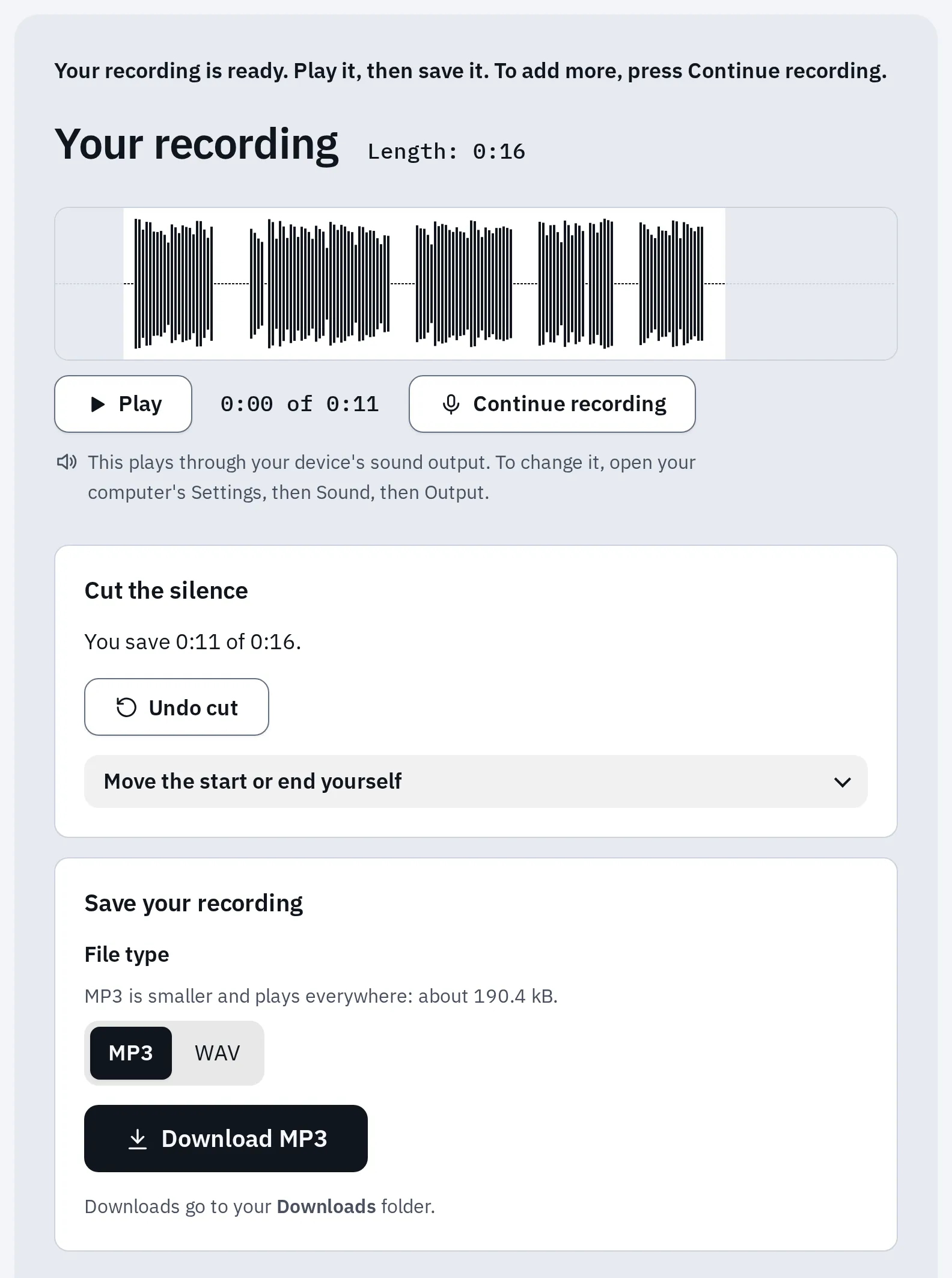
Our recorder after Stop and Cut the silence, with a speech-like test sound. Until you press Download MP3, the recording exists only in this tab.
MP3 or WAV? MP3 is about 1 MB a minute and plays everywhere. WAV is about 6 MB a minute and keeps the sound exactly as recorded. Archives such as the Library of Congress prefer uncompressed WAV for keeping. On a computer with room to spare, download both: choose WAV and press Download WAV, then choose MP3 and press Download MP3. WAV vs MP3 explains the difference.
Rename it and make the second copy
Windows
- Open your Downloads folder in File Explorer.
- Right-click the file and choose Rename (or click it and press F2). Type the new name and press Enter.
- For the second copy, right-click the file and choose Copy. Open the USB stick or your OneDrive folder, right-click an empty spot and choose Paste. Check that the file is still in Downloads too.
Mac
- Open your Downloads folder in the Finder.
- Click the file, press Return, type the new name and press Return again. Names can’t contain a colon.
- For the second copy, hold down Option while you drag the file onto a USB stick or into iCloud Drive. With Option it copies instead of moving. Check that the file is still in Downloads too.
iPhone and iPad
- Open the Files app, tap Browse, then Downloads.
- Touch and hold the file, then tap Rename.
- For the second copy, go back to our recorder (still open), press Share, then Save to Files, and choose another place, such as iCloud Drive or a USB drive. Or send the file to your computer. Don’t use Move in the Files app: it moves your only copy.
Voice Memos: tap the recording, then its name, and type a new one. To get the file out, tap the recording, tap the More button (…), then the Share button. Scroll down, tap Save to Files, choose a place and tap Save. Do it twice, to two places.
Android
- Open Files by Google and find the file in Downloads.
- Tap More next to the file (or press and hold it, then tap More), then Rename. Type the name and tap OK.
- For the second copy, tap More, then Back up to Google Drive. Or copy it to a computer.
Samsung Voice Recorder: when you tap Stop, you type the name, then tap Save. Your recordings are under Menu, then All recordings.
Recorder on a Pixel: touch and hold the recording, tap Share, then File and Audio, and choose where to send it. Its backup to recorder.google.com is a copy online.
Keep it safe for years
- The file you use and two backups
- 3 copies
- Two kinds of storage, such as a computer and the cloud
- 2 kinds
- One copy outside your home
- 1 away
The US Cybersecurity and Infrastructure Security Agency calls this the 3-2-1 rule. The Library of Congress and the National Archives also say to keep copies in separate places. The National Archives says not to rely on the cloud alone.
For example: the file on your computer, a copy on a USB stick in a drawer, and a copy in your cloud storage or at a relative’s home. On a phone, our recorder’s Share button can send the file straight to a relative.
- Give copies to the family. A copy saved on a sibling’s own computer is a copy outside your house. A shared link to your cloud folder isn’t: if you delete the file, it’s gone for them too. The Veterans History Project also asks you to give the storyteller a copy.
- Check the copies once a year: open each one and play a few seconds.
- Move them to new storage about every 5 years, as the Library of Congress suggests. USB sticks and old phones don’t last forever.
- Keep the note with the file: who, when, where and the topics. In 20 years, that note is what tells someone what’s on it.
Share a short clip
A favourite two-minute story is easier to share than an hour. Open the saved file in the audio trimmer and drag the two handles to the part you want. Add a 1-second fade at each end, then save it as MP3. The new file gets “(cut)” at the end of its name, so your full recording stays as it is.
Voice Memos files are M4A. If a relative’s player or a website only takes MP3, turn it into one with the M4A to MP3 converter.
Questions people ask
How long should a family story recording be?
About an hour at most for one sitting. The Library of Congress suggests about an hour, then a break or another day. A short recording is fine too: one good story is worth keeping.
Phone or laptop: which records better?
Either works when it is close to the storyteller in a quiet room. Distance and noise matter more than the device. Test both voices first with the mic quality test.
Do I need an external microphone?
No. It can help, and the Veterans History Project recommends one, but a phone close to the storyteller in a quiet room is clear enough for the family.
Does your voice recorder save my recording?
Only in the browser tab, until you download it. It never uploads it. Close or reload the page and the recording is gone, so press Download MP3 or Download WAV right after Stop.
What if my phone screen locks while I record?
In our voice recorder, the recording pauses and what you have is kept. Press Continue recording. The recorder keeps the screen on while it records, so this mostly happens with a call or when you switch apps. Google’s Recorder app on Pixel phones keeps recording with the screen asleep.
Can I record a video call with my grandparent?
Not with our voice recorder: it only records your own microphone. Ask everyone before you record a call. If your call app can record, make a short test call first and check that both voices are in the saved file. If it can’t, the storyteller can record their side with a recorder app and send you the file. To talk them through it, see helping a parent by phone.
Where can a family story be archived for good?
StoryCorps adds app interviews to its online archive and its collection at the Library of Congress when you publish them. A draft you don’t publish stays only on your device. The Veterans History Project collects interviews with US veterans. Both have their own consent steps and rules. Keep your own copies as well.